
Blog
What Is HR Software? The Complete Buyer’s Guide For 2026
Managing people sounds simple until you actually start doing it at scale.
Initially, it’s manageable. You know everyone on the team, employee details are easy to track, and processes like onboarding or payroll don’t feel overwhelming. A few spreadsheets, some documents, and a bit of coordination are enough to keep things running.
But as the team grows, things start to get messy.
Employee records are scattered across files. Onboarding becomes inconsistent. Payroll calculations take longer and leave more room for error. Keeping up with compliance requirements becomes stressful. What used to be simple tasks slowly turn into time-consuming processes that require constant attention.
That’s where HR software comes in.
If you’ve ever wondered what is HR software, the simplest way to think about it is this: it’s a system that helps you manage your people in a structured, organized, and scalable way. Instead of juggling multiple tools and manual processes, everything—from employee records to payroll processing, time tracking, and onboarding—can be handled within one connected platform.
But HR software isn’t just about making things easier.
It’s about creating consistency. It’s about reducing risk. And most importantly, it’s about giving your team a better experience as your company grows.
In this guide, we’ll break down how HR software works, what it actually helps you manage, and how businesses use it to handle everything from hiring to performance reviews and overall workforce management without losing control along the way.
Why Managing People Gets Complicated as Teams Grow
At the start, managing people doesn’t feel like a “system” problem.
You know everyone on the team. You remember who joined when, what their role is, and what they’re working on. If someone needs something, you just message them. If payroll needs to be processed, you handle it manually. It’s not perfect, but it works.
Then the team grows.
And that’s when things start to change, not suddenly, but in small ways that slowly build into bigger issues.
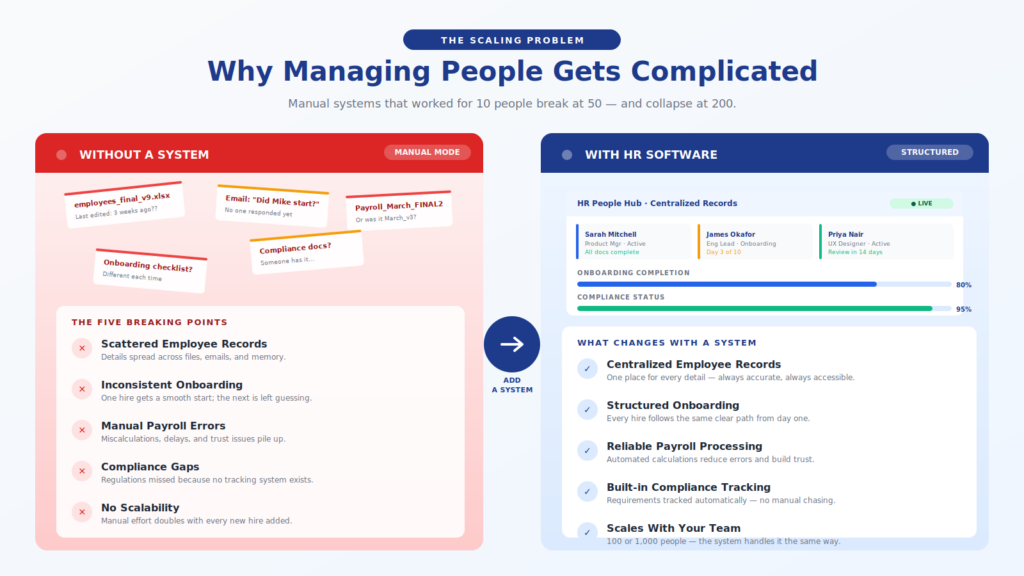
One of the first things that becomes difficult to manage is employee records.
In a small team, employee information might live in a few documents or spreadsheets. But as more people join, that information starts to spread out. Some details are in spreadsheets, others are in emails, some are stored in folders, and some are just remembered by someone on the team.
At that point, even simple questions become harder to answer:
- When did this employee join?
- What are their current details?
- Has their information been updated recently?
It’s not that the information doesn’t exist; it’s that it’s no longer easy to find or trust.
Then comes onboarding.
When you’re hiring occasionally, onboarding is usually informal. You guide the new hire, share documents, and walk them through the process. But as hiring becomes more frequent, that approach stops working.
Onboarding becomes inconsistent.
One new hire gets a smooth experience, while another struggles to understand what to do next. Important steps might be missed, documents might not be shared on time, and expectations may not be clearly communicated. Over time, this inconsistency affects both productivity and employee experience.
Payroll is another area where complexity builds quickly.
At first, payroll processing might seem straightforward. But as the team grows, calculations become more detailed. There are different roles, different compensation structures, deductions, and timing considerations.
Manual payroll handling increases the risk of:
- Errors in calculations
- Delays in payments
- Inconsistencies across employees
Even small mistakes can create trust issues, and fixing them often takes more time than preventing them.
Then there’s compliance.
In the early stages, compliance doesn’t feel urgent. But as the business grows, requirements become more demanding. Documentation needs to be maintained, policies need to be followed, and regulations need to be met.
Without a structured approach to compliance, it becomes difficult to ensure that everything is being handled correctly. And unlike other issues, compliance mistakes can have serious consequences.
What makes all of this challenging is not the individual tasks themselves—it’s the combination of them.
Each process, including records, onboarding, payroll, compliance, becomes harder to manage as the number of employees increases. And because these processes are interconnected, a gap in one area often affects another.
At that point, managing people is no longer just about communication or effort. It becomes a matter of coordination, consistency, and control.
3. So What Is HR Software, Really?
Now that we’ve looked at how managing people becomes more complex, the next question is simple: what exactly is HR software?
A clear answer to what is HR software is this:
HR software is a system that helps businesses manage employee information, processes, and interactions in a structured and centralized way.
This human resources software definition focuses on organization and consistency. It is not just a digital tool—it is a system that replaces scattered processes with a unified approach to managing people.
When an HR tool is explained in practical terms, it becomes easier to understand. Instead of handling employee-related tasks across multiple spreadsheets, documents, and communication channels, everything is managed within a single platform.
This includes:
- Maintaining employee information
- Managing internal processes
- Keeping records consistent over time
The key idea is not complexity; it is control.
HR software brings structure to processes that would otherwise rely on manual effort. It ensures that information is stored in one place, updated consistently, and accessible when needed.
It is not about doing more, it is about doing things in a way that remains organized as the business grows.
What an HR Platform Actually Handles Behind the Scenes
When people hear about HR software, they often think of it as a tool for handling a few specific tasks. But in reality, it operates behind the scenes as a system that connects multiple parts of people management.
A proper HR management software overview shows that it is not limited to one function, it handles a range of interconnected processes that support the entire employee experience.
To understand the HR platform meaning, it helps to think of it as the foundation on which HR operations run.
At its core, an HR platform manages employee data.
Instead of storing information across different locations, all employee details exist in one place. This includes personal information, job roles, and historical records. This centralized approach ensures that data remains consistent and accessible.
Another major area it handles is payroll.
Rather than calculating salaries manually, the system supports payroll processing in a structured way. This reduces errors and ensures that payments are handled consistently.
Onboarding is also managed within the platform.
Instead of relying on informal processes, onboarding becomes structured and repeatable. Each new employee goes through the same set of steps, ensuring consistency across hires.
Compliance is another critical function.
HR platforms help maintain records and processes required for compliance, making it easier to meet regulatory requirements without relying on manual tracking.
Benefits are also managed through the system.
With benefits administration, organizations can handle employee benefits in a structured way, ensuring that information remains organized and accessible.
This is where the concept of HRIS is explained.
An HRIS (Human Resource Information System) is essentially the system that brings all of these elements together. It acts as the central layer that connects employee data, processes, and operations into one unified structure.
What an HR platform actually handles is not just individual tasks, it manages the connections between them. This is what allows businesses to maintain consistency as they grow.
How HR Software Works Across the Employee Lifecycle
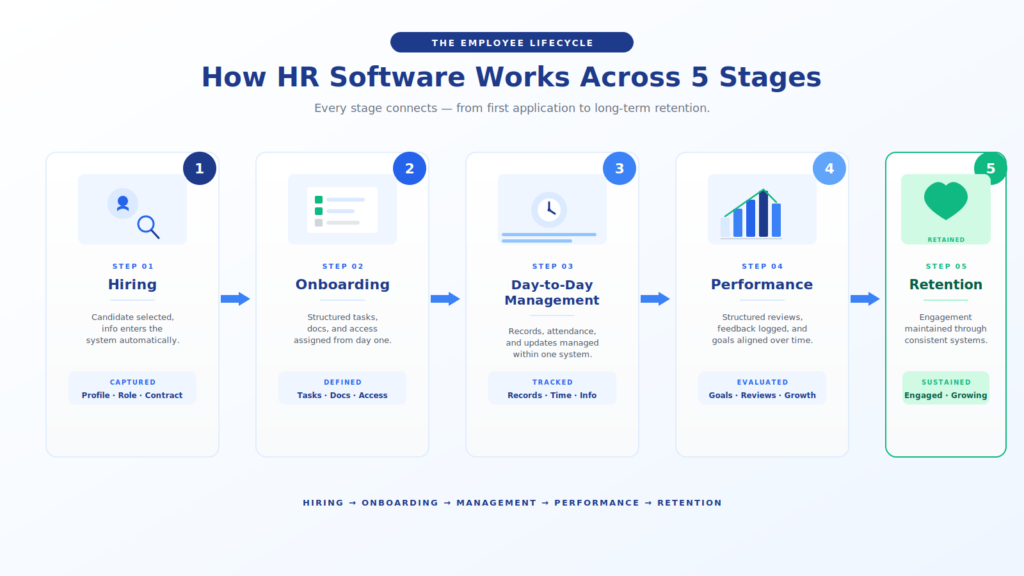
To really understand how HR software works, it helps to look at it as a continuous journey rather than a set of isolated tasks.
Managing people doesn’t happen in one moment—it happens across stages. From the time someone is considered for a role to the point where they grow within the company or move on, every step needs structure. This is precisely where HR software fits in.
Instead of handling each stage separately, it connects them into a single, consistent system.
Step 1: Hiring and Bringing People In
Everything starts with hiring.
At this stage, the goal is to bring the right people into the organization. Once a candidate is selected, their information begins to move into the system, becoming part of the company’s internal records.
This is where the transition begins, from an external candidate to an internal employee.
Step 2: Structured Onboarding
Once hiring is complete, the next step is onboarding.
This is one of the most important stages in the employee lifecycle because it sets the tone for everything that follows. With HR software, onboarding is no longer informal or inconsistent. It becomes a defined process where every new hire goes through the same structured steps.
They receive the necessary documents, understand their responsibilities, and are guided through their initial experience without confusion. This consistency ensures that no critical steps are missed.
Step 3: Day-to-Day Employee Management
After onboarding, the focus shifts to managing employees on an ongoing basis.
This includes maintaining employee records, tracking attendance through time tracking, and ensuring that day-to-day operations run smoothly. At this stage, the system plays a crucial role in keeping information updated and accessible.
Instead of relying on scattered data, everything is managed within one platform, which helps maintain continuity across all employee-related activities.
Step 4: Performance Evaluation and Feedback
As employees continue working, evaluation becomes essential.
Through structured performance reviews, organizations can assess how employees are progressing. Feedback becomes part of a consistent process rather than something that happens occasionally or informally.
This stage helps align individual performance with company goals while also providing employees with clarity on expectations and growth.
Step 5: Retention and Long-Term Engagement
The final stage is retention.
At this point, the focus shifts from managing tasks to maintaining engagement. HR software supports this by ensuring that processes remain consistent and that employees continue to feel supported within the system.
This includes everything from ongoing communication to maintaining accurate records and tracking long-term performance.
Bringing It All Together: Workforce Management
When all of these steps are connected, they form what is known as workforce management.
Instead of treating hiring, onboarding, and performance as separate activities, HR software creates a continuous system that manages the entire employee lifecycle.
Each stage flows into the next, ensuring that transitions are smooth and that nothing is lost along the way. This is what allows organizations to manage people effectively—not just at one stage, but throughout their entire journey.
The Capabilities That Keep HR Running Smoothly
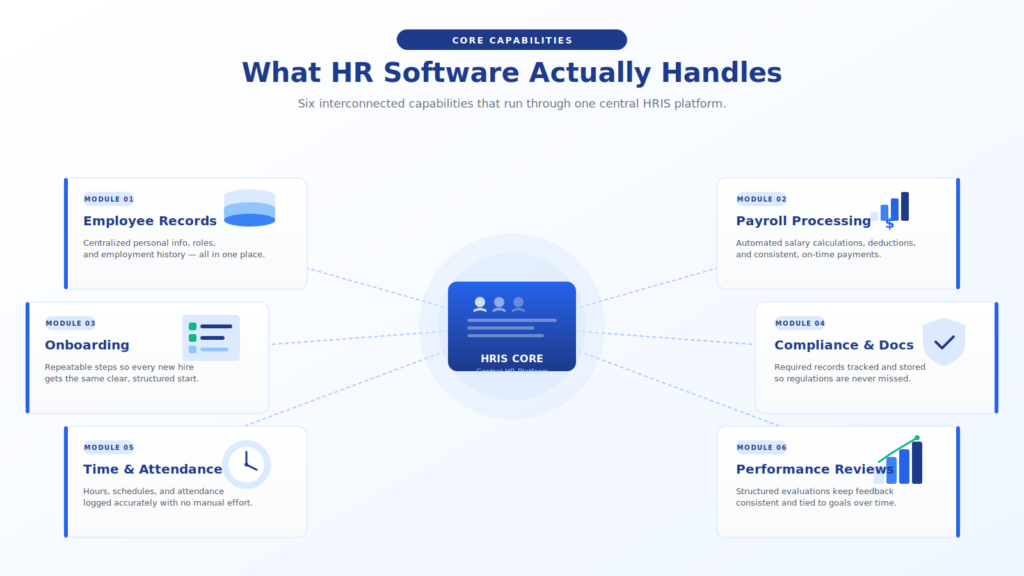
HR software works because it brings together several core capabilities that support different aspects of people management.
Each of these plays a specific role, but together they create a system that keeps operations running smoothly.
Managing Employee Records
At the center of any HR system are employee records.
These records store essential information about each employee, including personal details, job roles, and historical data. Instead of being scattered across multiple files, everything is centralized.
This makes it easier to maintain accuracy and ensures that information is always available when needed.
Payroll and Compensation Handling
Handling salaries manually becomes difficult as teams grow.
With structured payroll processing, HR software ensures that compensation is calculated and managed consistently. This reduces the risk of errors and ensures that employees are paid accurately and on time.
Time and Attendance Tracking
Tracking working hours is essential for both operational and compliance reasons.
Through time tracking, HR software allows organizations to monitor attendance, manage schedules, and maintain accurate records of working hours.
Onboarding New Employees
Bringing new employees into the organization requires a structured approach.
With built-in onboarding processes, HR software ensures that each new hire follows a consistent path. This improves the overall experience and reduces confusion during the initial stages.
Compliance and Documentation
Maintaining proper documentation is critical.
HR software helps manage records and processes required for compliance, ensuring that organizations meet regulatory requirements without relying on manual tracking.
Benefits and Compensation Management
Managing employee benefits can become complex over time.
Through benefits administration, HR software allows organizations to handle benefits in a structured and organized way, ensuring that information remains clear and accessible.
Performance Tracking and Reviews
Evaluating employee performance is an ongoing process.
With structured performance reviews, organizations can maintain consistency in how performance is assessed, ensuring that feedback is documented and aligned with organizational goals.
From Hiring to Retention: Managing the Full Workforce
Managing employees is not just about individual processes—it is about understanding how those processes connect over time.
This is where workforce management becomes important.
It looks at the bigger picture.
Instead of focusing only on hiring, onboarding, or payroll, workforce management considers how all of these elements work together to support the organization as a whole.
It ensures that:
- Employees are brought in effectively
- Processes remain consistent
- Performance is tracked over time
- Long-term engagement is maintained
HR software plays a central role in this by connecting all stages into one system.
How HR Software Improves Day-to-Day Operations
The biggest impact of HR software is often seen in everyday operations.
Tasks that once required manual effort become structured processes. Instead of handling each action separately, teams operate within a system that supports consistency.
For example, updating employee information no longer requires searching across multiple files. Processing payroll does not depend on manual calculations. Tracking attendance does not require separate systems.
Each of these actions becomes part of a larger workflow.
This does not just save time, it reduces friction.
When processes are clear and consistent, teams spend less time managing tasks and more time focusing on meaningful work.
Why Businesses Move to HR Software
Businesses do not adopt HR software simply because it exists.
They move to it because manual systems stop working at scale.
As teams grow, the combination of:
- Scattered employee records
- Inconsistent onboarding
- Manual payroll processes
- Increasing compliance requirements
creates a level of complexity that is difficult to manage without structure.
At this stage, the issue is not effort; it is sustainability.
Manual processes rely on individuals to maintain consistency. But as the volume of work increases, that consistency becomes harder to maintain.
HR software provides a system that replaces this reliance on manual effort with structured processes.
It allows businesses to manage growth without losing control over how people-related operations are handled.
Benefits of HR Software for Businesses
Once HR software becomes part of daily operations, the improvements are not just visible—they’re felt across the entire organization.
At first, it may seem like you’ve simply replaced spreadsheets with a system. But over time, the way people-related processes behave starts to change in a meaningful way.
Better Visibility Into Employee Information
One of the most immediate benefits is clarity.
With centralized employee records, information is no longer scattered across files and documents. Everything is stored in one place, which makes it easier to access, update, and trust. This reduces confusion and allows teams to make decisions based on accurate data rather than assumptions.
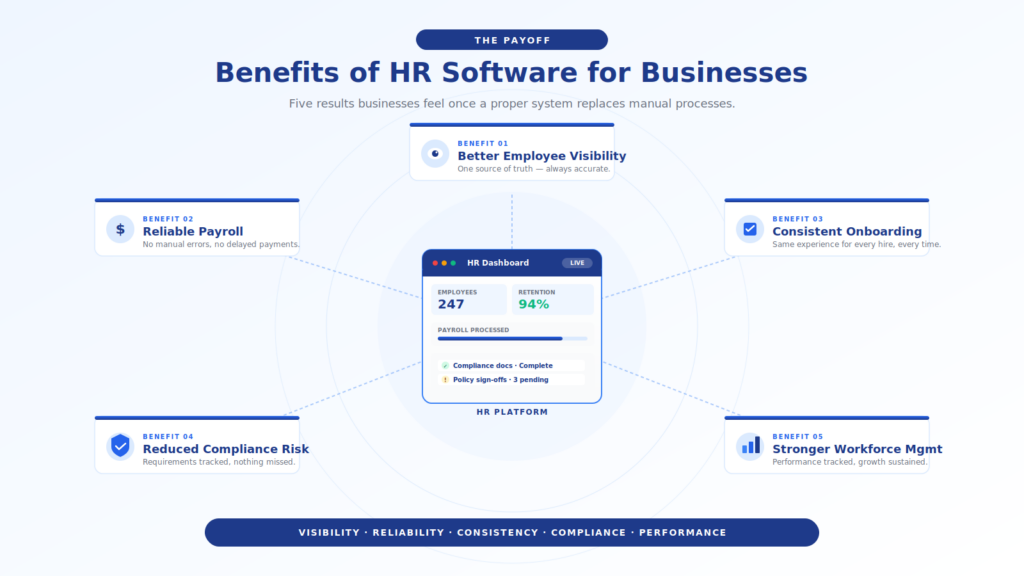
More Reliable Payroll Processing
Payroll becomes significantly more stable once it is handled within a system.
Manual payroll processing often leaves room for errors, especially as compensation structures become more complex. With HR software, calculations are standardized, and processes become more consistent. This reduces mistakes and builds trust among employees.
Consistent Onboarding Experience
A structured onboarding process ensures that every new hire starts with the same level of clarity.
Instead of relying on informal processes, HR software provides a repeatable system where tasks, documents, and expectations are clearly defined. This improves the employee experience from day one and helps new hires become productive faster.
Improved Compliance And Reduced Risk
Compliance becomes easier to manage when processes are structured.
Instead of manually tracking documents and requirements, HR software helps maintain records needed for compliance. This reduces the risk of missing important steps and ensures that the organization stays aligned with regulations.
Better Employee Performance Tracking
With structured performance reviews, organizations can maintain consistency in how employees are evaluated.
Feedback is recorded, progress is tracked over time, and performance becomes part of a continuous process rather than a one-time event. This helps both employees and managers stay aligned on expectations.
Stronger Workforce Management
At a broader level, HR software improves workforce management.
It connects different aspects of people management—records, payroll, onboarding, and performance—into a single system. This allows businesses to manage growth without losing control over how employees are supported and managed.
How a Company Manages Employees Using HR Software
To understand how HR software works in practice, let’s look at an example.
Imagine a growing company called Northbridge Labs, a digital product company with around 75 employees.
In the early days, Northbridge Labs managed everything manually. Employee details were stored in spreadsheets, onboarding was handled through emails, and payroll was calculated separately each month.
As the company grew, these processes became difficult to manage.
That’s when they introduced HR software.
Hiring And Onboarding
When a new employee joins, the system automatically initiates the onboarding process.
The new hire receives:
- Required documents
- Onboarding tasks
- Access to relevant information
Everything is structured, so no steps are missed. This creates a consistent experience for every employee.
Managing employee records
All employee records are stored within the system.
This includes:
- Personal details
- Role information
- Employment history
Instead of searching across files, the HR team can access everything in one place.
Payroll and time tracking
For salaries, the company uses built-in payroll processing.
The system calculates compensation based on defined rules, reducing manual effort and minimizing errors. At the same time, time tracking ensures that attendance and working hours are recorded accurately.
Performance and growth
As employees continue their journey, the system supports performance reviews.
Managers provide structured feedback, and employee progress is tracked over time. This creates a consistent approach to evaluating performance.
Ongoing workforce management
At a higher level, Northbridge Labs uses the system for workforce management.
They can:
- Track employee growth
- Manage team structure
- Maintain consistency across departments
What started as a tool for managing tasks becomes a system that supports the entire employee lifecycle.
HR Software vs Manual HR Processes
The difference between HR software and manual processes is not just about convenience: it’s about reliability and scale.
How Manual HR Processes Work
Manual systems rely on:
- Spreadsheets
- Documents
- Email communication
Each process is handled separately, which makes it difficult to maintain consistency.
For example:
- Employee records may exist in multiple files
- Onboarding may vary from one hire to another
- Payroll processing may require repeated calculations
As the organization grows, these processes become harder to manage.
How HR Software Changes the Approach
HR software replaces fragmented processes with a unified system.
Instead of managing each task individually, everything is connected:
- Records are centralized
- Onboarding is standardized
- Compliance is structured
This reduces dependency on manual effort and ensures that processes remain consistent over time.
The Key Difference
Manual processes depend on people to maintain structure.
HR software provides the structure itself.
This shift allows organizations to manage complexity without increasing workload.
HR Software vs Payroll Tools vs ERP Systems
HR software is often compared with other business tools, but each serves a different purpose.
HR software
HR software focuses on managing people.
It handles:
- Employee records
- Onboarding
- Performance reviews
- Workforce management
Payroll Tools
Payroll tools are more specialized.
They focus primarily on payroll processing, including salary calculations, deductions, and payments. While they are useful, they do not cover the full scope of HR operations.
ERP Systems
ERP (Enterprise Resource Planning) systems manage broader business operations.
They include:
- Finance
- Inventory
- Procurement
HR may be one part of an ERP system, but it is not the primary focus.
How They Fit Together
These systems are not replacements for each other—they are complementary.
- HR software manages people
- Payroll tools manage compensation
- ERP systems manage operations
Understanding this distinction helps businesses choose the right system for their needs.
Popular HR Software Platforms
There are many HR platforms available, each designed for different types of organizations.
Some of the most widely used include:
Known for its user-friendly interface and strong focus on managing employee data and onboarding processes.
Popular for combining HR functions with payroll processing, making it ideal for small to mid-sized businesses.
Designed for larger organizations, offering advanced features for workforce and financial management.
A flexible solution that supports a wide range of HR functions, including time tracking and performance management.
Each platform offers different capabilities, and the right choice depends on how a business manages its HR processes.
How to Choose the Right HR Software
Choosing HR software is not about finding the most advanced system—it’s about finding one that fits your organization.
Company Size
Smaller teams may need simpler tools, while larger organizations require more structured systems.
The level of complexity should match the size of the workforce.
Payroll Needs
If payroll is a major concern, look for systems with strong payroll processing capabilities.
This ensures that compensation is handled efficiently and accurately.
Compliance Requirements
Different businesses face different compliance requirements.
Choosing a system that supports compliance helps reduce risk and ensures that processes are handled correctly.
Integration Needs
HR software rarely operates in isolation.
It often needs to connect with other tools, such as accounting or project management systems. Ensuring compatibility makes the system more effective.
Common HR Software Mistakes
Even with the right tool, mistakes can limit effectiveness.
Overcomplicating the setup
Trying to implement too many features at once can make the system difficult to use.
Starting simple and expanding gradually is more effective.
Ignoring data quality
If employee records are inaccurate or incomplete, the system becomes unreliable.
Maintaining clean data is essential.
Lack Of Consistency
HR software depends on consistent usage.
If processes are not followed properly, the system loses its value.
Treating it as just a tool
HR software is not just a tool—it is a system.
Without a clear approach, it becomes another platform instead of a solution.
The Future of HR Software
HR software is evolving as organizations place more focus on employee experience and efficiency.
AI in HR
Artificial intelligence is being used to:
- Automate repetitive tasks
- Analyze workforce data
- Improve decision-making
Automation Of Hr Processes
Automation is reducing manual effort in areas like onboarding and payroll processing, making operations more efficient.
Focus On Employee Experience
Modern HR platforms are shifting toward improving how employees interact with the system.
This includes:
- Easier access to information
- Better communication
- More personalized experiences
Conclusion
HR software provides a structured way to manage people, processes, and growth.
As organizations scale, manual systems become harder to maintain. HR software replaces these systems with a unified approach that supports consistency, visibility, and efficiency.
Understanding how it works is the first step toward building a more organized and scalable approach to managing your workforce.
FAQs
What is HR software in simple terms?
HR software is a system that helps businesses manage employee-related processes in one place. It includes managing employee records, payroll processing, onboarding, and performance tracking. Instead of using multiple tools, everything is handled within a single platform. This makes it easier to stay organized and maintain consistency. Over time, it helps businesses scale their HR operations efficiently.
Is HR software only for large companies?
No, HR software can be used by businesses of all sizes. Small companies benefit from better organization, while larger organizations rely on it for managing complex operations. Even a small team can improve processes like onboarding and payroll using the right system. As the company grows, the same system can scale to meet new needs.
How does HR software help with compliance?
HR software helps maintain records and processes required for compliance. It ensures that documentation is stored properly and that required steps are followed consistently. This reduces the risk of missing important requirements. It also makes it easier to access information when needed for audits or reporting.
Can HR software handle payroll processing?
Yes, many HR platforms include built-in payroll processing or integrate with payroll tools. This allows businesses to manage compensation within the same system. It reduces manual calculations and ensures consistency in payments. This is especially useful as the number of employees increases.
What should I look for in HR software?
You should look for features that match your needs, such as employee records management, onboarding, payroll processing, and compliance support. It is also important to consider ease of use and scalability. The best system is one that your team can adopt easily and use consistently.
Conclusion
Managing people doesn’t get harder because the work itself changes—it gets harder because the volume, complexity, and expectations around that work increase.
What starts as a few simple processes—tracking employee records, handling payroll processing, managing onboarding, and keeping up with compliance—quickly turns into a system that needs structure to function properly. Without that structure, even well-run teams begin to experience inconsistencies, delays, and unnecessary friction.
That’s where understanding what is HR software becomes important.
It’s not just about using a new tool. It’s about shifting from scattered processes to a system that connects everything—people, data, and operations—into one organized flow. From hiring to performance reviews and long-term workforce management, HR software creates the consistency needed to manage growth without losing control.
For businesses that are scaling, this shift is not optional. It becomes the foundation for handling people-related operations in a way that remains reliable over time.
About Software Chronicle – Research-Driven Insights from Software Experts
Software Chronicle is run by a team of SaaS researchers and former software buyers who have collectively evaluated over 200 tools across the categories we cover. Our contributors bring experience from marketing operations, startup environments, IT management, and content strategy, allowing us to approach software from a practical, real-world perspective. With team members based across the USA, UK, and Australia, our insights reflect actual pricing, support quality, and regional availability that businesses experience.
Our goal is simple: to make complex software easier to understand without oversimplifying it. Every guide is designed to provide structured, reliable insights that help you evaluate tools, understand systems, and make better decisions with confidence.
Have questions or need guidance? Contact us — we’re here to help.

Najm Us Sahar Fareed is part of the editorial team at Software Chronicle, a group of SaaS researchers and former software buyers who have collectively evaluated over 200 tools across the categories we cover. With 5 years of experience working with digital marketing agencies across North America, she brings a strong background in content strategy and practical software evaluation.
Blog
CRM for Freelancers: Do You Really Need One?
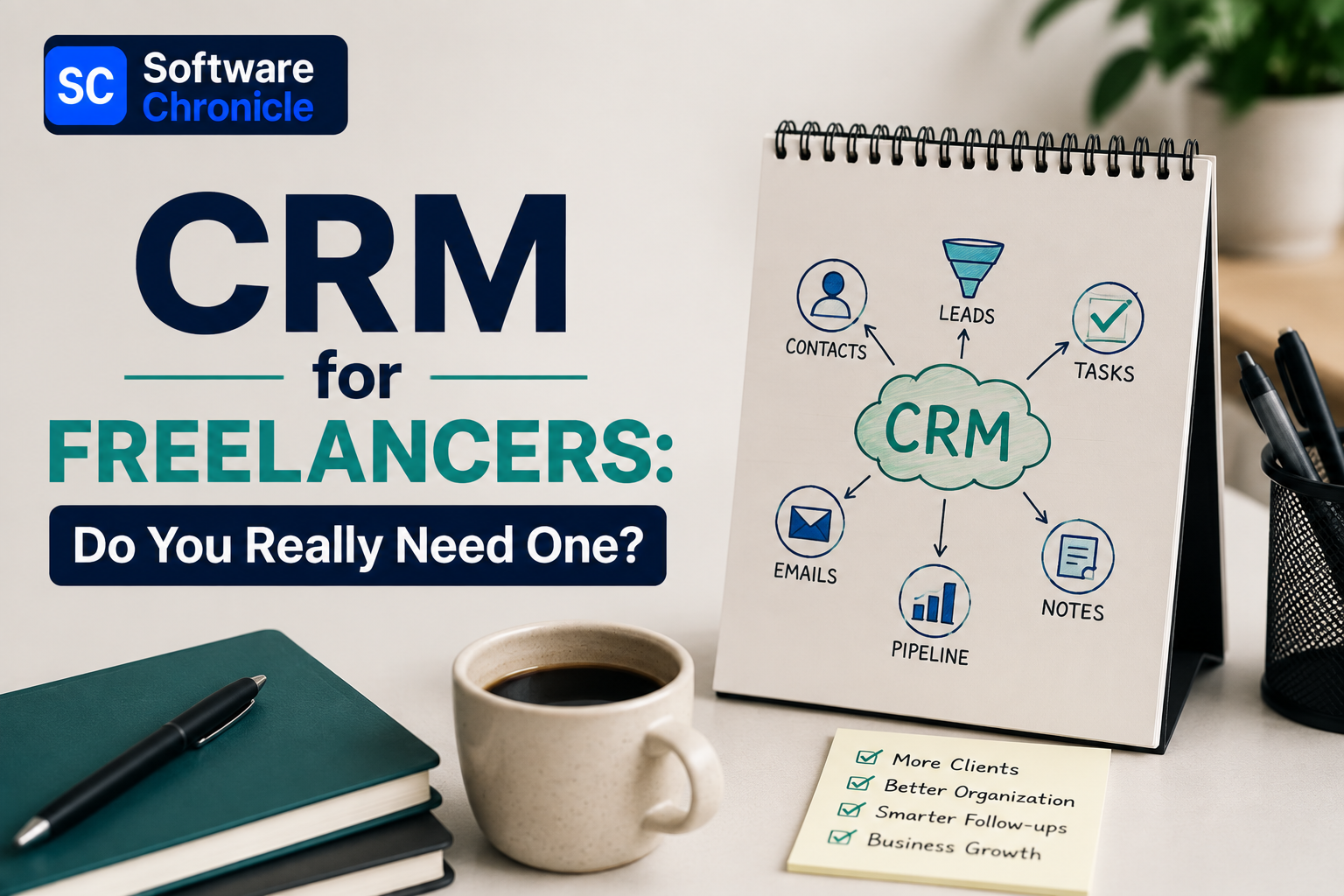
The honest answer is that most freelancers don’t need one, right up until the exact moment they very obviously do, and the gap between those two states is smaller than the CRM industry’s marketing wants you to believe. A freelancer with six active clients, decent invoice tracking habits, and a good memory can run their whole business from a spreadsheet and a calendar reminder. A freelancer with twenty-five clients across three service types, half of them on retainers, cannot, and pretending otherwise is how a proposal gets forgotten and a client gets lost.
Whether you’re searching for a CRM for consultants, a CRM for independent contractors, or just a CRM for freelance designers billing by the project, this isn’t a roundup pretending every solo CRM user needs the same tool a sales team does, or a list of affiliate links dressed up as advice.
It’s a genuine answer to whether you need one at all, and if the answer turns out to be yes, which kind actually fits a small CRM for one person rather than the sales-team tool your business logic was borrowed from, whether you call yourself a freelancer, a consultant, or an independent contractor.
Our deeper comparison of running client management on a CRM versus a spreadsheet covers the mechanics of that decision in more depth than this piece has room for.
TL;DR
- The real trigger isn’t a headcount rule of thumb; it’s whether you’re currently losing track of a proposal, a follow-up, or an invoice. If nothing is slipping, a spreadsheet is still doing its job.
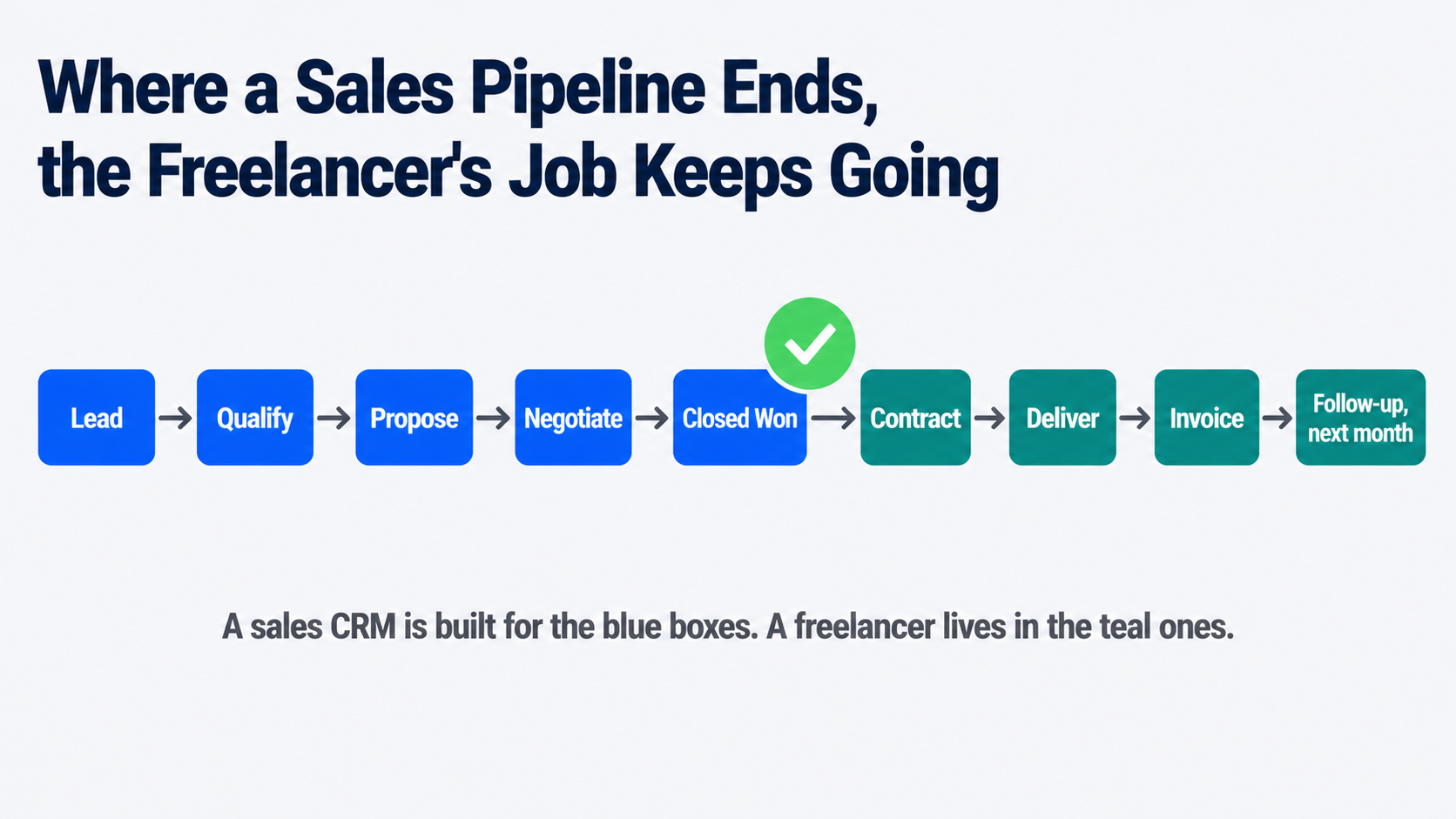
- A freelance CRM and a traditional sales CRM solve different problems. Sales CRMs manage a pipeline that ends at “closed won.” Freelancer tools manage everything that happens after that: proposals, contracts, retainer invoicing, and a client portal.
- Free genuinely exists here: HubSpot’s free CRM tier and Notion, which isn’t built as a CRM but is widely used as one, both cost nothing and cover the basics competently.
- Watch for the “free trial that’s really a demo” trap. Some freelancer-focused tools cap a free plan at three or five clients, which reads as generous and functions as a paywall for anyone with real client volume.
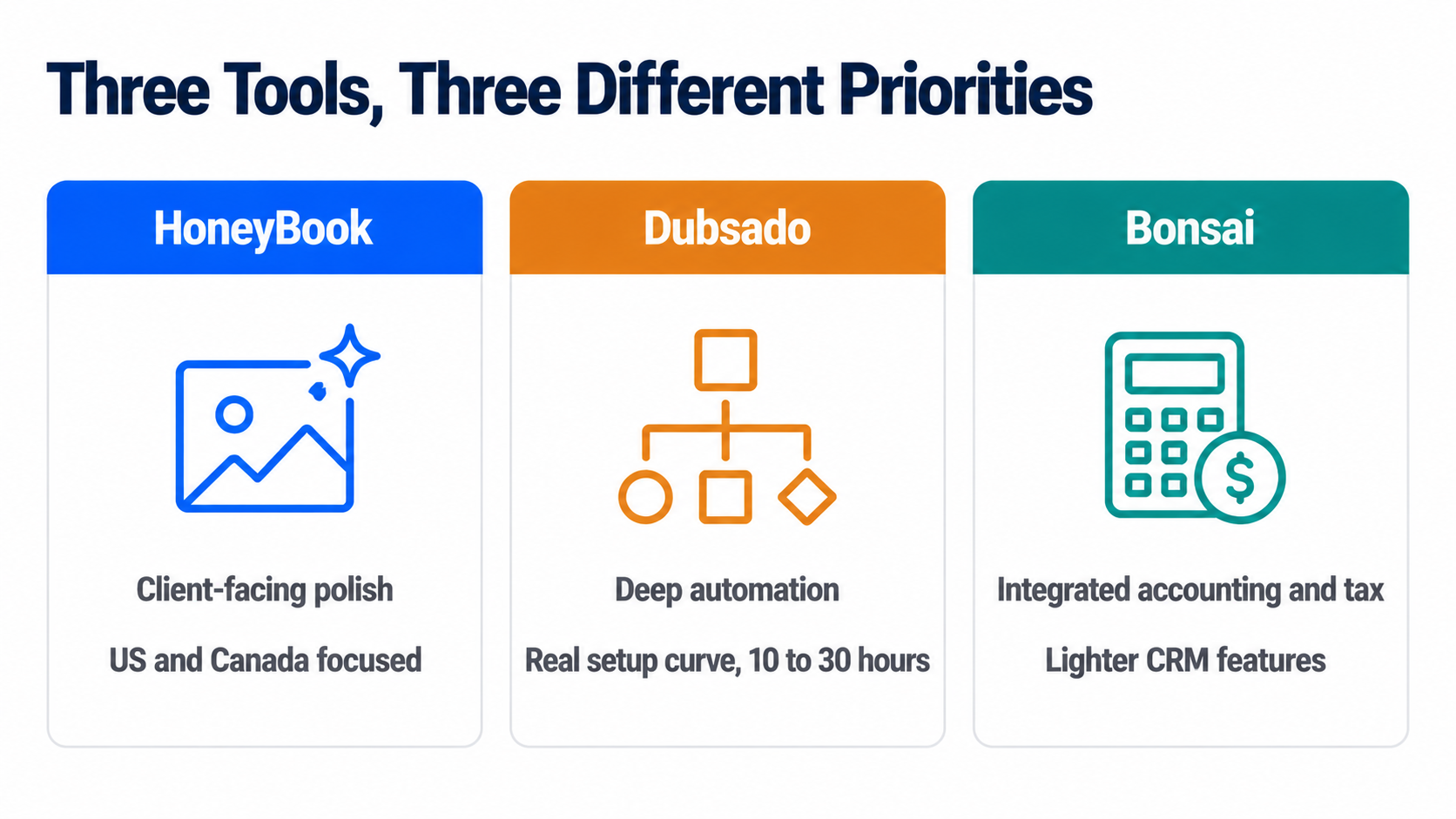
- HoneyBook, Dubsado, and Bonsai are the three names that dominate this category, and they solve genuinely different priorities: polish, deep automation, and integrated accounting, respectively, not the same tool at three price points.
- Client portal access is the single feature that most changes a freelancer’s day-to-day admin load, since it moves “can you resend that invoice” out of your inbox entirely.
- The decision to add a CRM is really a decision about what a forgotten follow-up currently costs you. Price that honestly before pricing any of the tools.
The Real Trigger Isn’t a Client Count
Most advice in this category gives you a number, “once you have ten clients” or “past fifteen active projects,” and numbers like that are comforting because they’re easy to check and mostly beside the point. The actual signal is behavioral, not numerical: are you currently forgetting things? A proposal you meant to follow up on that went quiet for three weeks. An invoice you’re pretty sure you sent but can’t confirm without digging through email. A client whose project status lives only in your memory, and it’s a Friday afternoon, and you can’t quite remember if you’re waiting on them or they’re waiting on you.
If none of that is happening, a well-organized spreadsheet with a consistent set of columns- client name, status, last contact date, next action- is a completely legitimate system, and switching to a paid tool at that point adds a subscription without solving a problem you don’t have. If any of that is happening regularly, the spreadsheet has already failed, quietly, and a proposal follow-up system tuned specifically for freelance work is worth its monthly cost many times over the first time it catches something you’d have dropped.
Why a Sales CRM Is Usually the Wrong Shape
This is where a lot of freelancers waste real setup time. A traditional CRM, HubSpot’s sales product, Pipedrive, Salesforce, is built around a pipeline with a clean ending: a deal moves through stages and closes, won or lost, and the tool’s whole design assumes a team working that pipeline together.
Our comparison of CRMs built for B2B sales teams makes this shape explicit, and it’s worth reading precisely to see how differently that category is built. Freelance work doesn’t end at closed won; it starts there. You’re the one drafting the proposal, negotiating the scope, delivering the project status update, tracking hours if you bill hourly, sending the invoice, following up on the invoice, and starting the retainer conversation for next month, alone, often for a dozen clients simultaneously.
A tool built for a sales team’s handoff between departments solves a problem you don’t have and skips the one you do, which is exactly why a separate category of single-user CRM built specifically for freelancers and consultants exists at all.
The Free Options Worth Trying Before You Pay Anything
For anyone specifically hunting for a free CRM freelancer option rather than a paid subscription, two genuinely free routes exist, and both are legitimate starting points rather than crippled trials.
HubSpot’s free CRM tier covers contact and deal tracking competently and costs nothing indefinitely, not just for a trial window. It’s a real sales-style CRM, though, so it inherits the pipeline shape described above, useful for tracking who you’re talking to and where a conversation stands, less useful for the proposal-to-invoice workflow that’s the actual daily grind of freelance client management.
Notion isn’t built as a CRM at all, and a large number of freelancers use it as one anyway, building a client database with linked pages for proposals, notes, and status, entirely custom to how they actually work. The honest trade-off: total flexibility in exchange for building the system yourself, with no automated reminders or client portal unless you construct them, which for someone who already thinks in Notion is a genuine advantage and for someone who doesn’t is real setup work for no clear payoff.
Read next: if you’re weighing whether to stay on a spreadsheet at all, our full breakdown of CRM versus spreadsheets walks through exactly where a spreadsheet stops scaling and why.
When You’ve Actually Outgrown the Spreadsheet
Three names dominate the freelancer-specific category, and they’re worth understanding as three different priorities rather than three tiers of the same product.
HoneyBook is the most client-facing and polished of the three, with strong proposal design, integrated payments, and a client portal built to look professional to someone hiring you for the first time. It’s priced at the higher end of this category, and it’s primarily built for the US and Canadian market, which is a real constraint if you bill clients internationally.
Dubsado leads on automation depth, branching email sequences, and conditional workflows that can run an entire client onboarding process without you touching it after the first trigger. That depth comes with a genuinely steep setup curve, commonly cited at ten to thirty hours to configure properly, and its free plan caps at three clients, which one honest reviewer flatly called a demo rather than a real free tier, a fair description for anyone with real client volume.
Bonsai sits at a lower entry price than either and differentiates on integrated accounting and tax estimation built specifically for US sole proprietors, alongside contracts and time tracking. Its CRM and communication-tracking features are comparatively lighter than HoneyBook’s or Dubsado’s, which is the right trade for a freelancer whose real pain point is disorganized invoicing and tax prep rather than a complex sales process.
Pricing across all three genuinely moves and varies by promotion, so treat any specific figure as a starting point to confirm on the vendor’s own pricing page rather than a locked-in number. If you do decide to switch, our guide on how to choose a CRM covers the evaluation questions worth asking regardless of which of the three you’re leaning toward.
Frequently Asked Questions
Do you really need a CRM in 2026?
Only if something is currently slipping through the cracks of whatever system you’re using now. The year doesn’t change the answer; the behavior does. A freelancer with a handful of long-term clients and a reliable habit of checking a spreadsheet weekly has no real gap a CRM closes. A freelancer juggling a growing, varied client list who’s already missed a follow-up or sent a late invoice has a gap that’s costing real money, and closing it is worth a subscription.
What is the best CRM for freelancers?
There isn’t one best answer, because HoneyBook, Dubsado, and Bonsai solve different priorities rather than competing head-to-head on the same thing. HoneyBook for client-facing polish, Dubsado for deep automation once you’re willing to invest real setup time, Bonsai for integrated accounting alongside lighter CRM features. The better question to ask yourself first is which specific pain point is costing you time right now: disorganized proposals, manual invoice chasing, or messy client communication, since that answer points to a different one of the three.
Which CRM is beginner friendly?
Bonsai and HubSpot’s free tier are the two most forgiving starting points, for different reasons. Bonsai’s interface is deliberately simple, and most of its features work reasonably well out of the box without heavy customization, which suits someone who wants a working system on day one rather than a project to configure. HubSpot’s free CRM has a gentler learning curve specifically because its scope is narrower- contacts and deals- without the proposal, contract, and portal features the freelancer-specific tools add. Dubsado, by contrast, is the one most consistently described as having a real learning curve, powerful once configured and genuinely time-consuming to get there.
Is Upwork or Fiverr better?
That’s a separate decision from whether you need a CRM, and it depends mainly on how you prefer to find work. Upwork tends to suit ongoing, higher-value client relationships and hourly or longer-term contracts, while Fiverr is built around fixed-price, productized gigs a buyer can purchase directly. Worth noting for this article’s actual topic: neither platform replaces a CRM, since both are lead sources, not client management systems, and freelancers who rely on either one still need somewhere to track proposals and follow-ups once a project moves off the platform.
A brief editorial note: one supplied question for this article, about specific top freelancers in a particular country, isn’t something this piece can answer responsibly. Naming individual freelancers as “the best” would require claims we have no way to verify, and it sits outside what this article is actually about- CRM software rather than freelancer rankings- so we’ve left it out rather than guess.
How Software Chronicle Researches and Publishes Software Reviews
Software Chronicle is an independent publication covering business and developer software. We look at what a tool is actually built to solve rather than treating every CRM as interchangeable, and we say plainly when the honest answer to “do you need this” is no. No software vendor owns us, funds us, or influences our editorial decisions. More about who we are is on our About us page.
Some links in this article are affiliate links, which means we may earn a commission if you purchase through them at no additional cost to you. Those arrangements never affect which tools we include or how we rank them. The specifics are in our affiliate disclosure, and the process behind every comparison is documented in our how we review software page. Pricing in this category moves often and varies by promotion, so confirm current rates directly with the vendor before subscribing. If you spot something out of date or want a tool considered for a future update, contact us.
Najm Us Sahar Fareed is part of the editorial team at Software Chronicle, a group of SaaS researchers and former software buyers who have collectively evaluated over 200 tools across the categories we cover. With 5 years of experience working with digital marketing agencies across North America, she brings a strong background in content strategy and practical software evaluation.
Blog
CRM for Real Estate Agents: Best Options

If a “best real estate CRM” list you are reading in 2026 still recommends LionDesk, stop reading it. Lone Wolf Technologies, which bought LionDesk in 2021, wound the product down at the end of September 2025 and migrated existing accounts to a new platform called Lone Wolf Relationships.
New signups have not been possible for months. A surprising number of comparison articles still list it as a budget pick, which tells you those articles have not been checked since before the shutdown, and it is a useful filter for how much to trust the rest of their numbers.
That kind of churn is normal in this category specifically. Real estate CRMs are not a slower-moving version of general CRM software; they are a genuinely different market shaped by brokerage politics, MLS data feeds, and lead-buying economics that a HubSpot or Pipedrive comparison never has to account for.
This guide covers what actually separates a real estate CRM from a general one, current pricing, and the ownership question that decides more outcomes than any feature list for anyone comparing property management CRM options against pure sales tools. For the general buying framework underneath all of this, our guide on how to choose a CRM is worth reading alongside this one.
Quick Takeaways
- LionDesk was discontinued at the end of September 2025. If a 2026 list still recommends it, treat every other figure in that list as unverified too.
- Follow Up Boss is CRM-only, no IDX website, no lead generation, so it is not directly cost-comparable to bundled platforms like kvCORE.
- Data portability is the decision most lists skip. Brokerage-provided CRMs such as kvCORE inside eXp or KW Command typically do not export cleanly when you change brokerages. Independent CRMs travel with you.
- Wise Agent covers up to five people for around $49 a month, which makes it the strongest value pick for a small team rather than just a solo agent.
- Contract terms vary sharply. Sierra Interactive and CINC lock you into a non-refundable twelve-month term. Follow Up Boss, Wise Agent and most CRM-only tools run month to month.
- MLS integration is not universal. Confirm a tool syncs with your specific local MLS before paying for anything, since coverage is regional and inconsistent between vendors.
- Real Broker’s proprietary reZEN platform handles transactions and compliance, not lead nurture. Agents get a bundled Lofty CRM account for that side of the business.
- Automated drip campaigns and lead routing are the two features that separate a real estate CRM from a general one. If a tool cannot do both well, it is not really built for this industry regardless of what it claims.
What Makes a CRM “Real Estate” Rather Than General
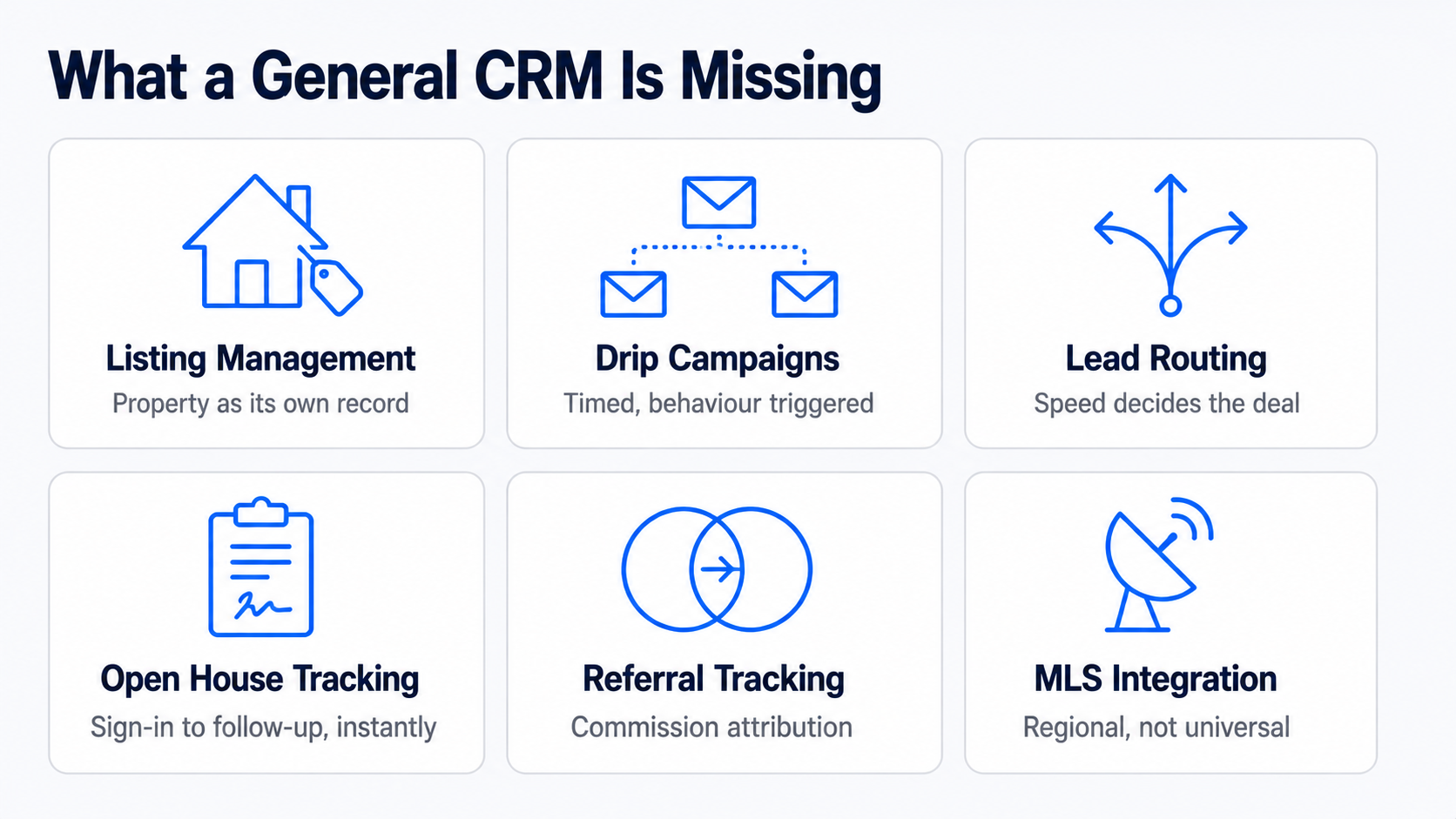
For anyone searching crm for realtors rather than a generic sales tool, the distinction starts here: a general-purpose CRM tracks a deal through a pipeline. A real estate CRM has to do that plus several things unique to how property transactions actually work.
| Capability | What it does | Why general CRMs handle it poorly |
| Listing management | Tracks a property’s status, showings, and documents alongside the client record | General CRMs have no concept of a property as its own linked object |
| Automated drip campaigns | Long-running, behaviour-triggered email and text sequences tailored to buyer or seller stage | Generic automation exists, but real estate templates and timing are pre-built here |
| Lead routing | Assigns a new lead to the right agent by territory, price band or round robin, instantly | Speed matters enormously in this industry; a slow routing rule loses the lead |
| Open house tracking | Digital sign-in, instant follow-up sequencing, and attendee data feeding straight into the pipeline | Not a concept that exists outside real estate |
| Referral tracking | Attributes a closed deal back to the referring agent or client for commission and relationship purposes | General CRMs track deal source, not referral commission chains |
| Client follow-up cadence | Reminds an agent when a past client’s mortgage anniversary or moving window is likely, not just active leads | General CRMs have no concept of a dormant client worth re-engaging on a schedule |
| MLS integration | Pulls live listing data and IDX website content directly into contact and property records | Requires a licensed data feed specific to each regional MLS |
The first two rows, listing management and drip campaigns, are where the category earns its existence. Everything else is a real differentiator, but a tool that gets those two wrong is not worth considering regardless of what else it offers.
The Tools Worth Comparing
| Tool | Best for | Starting price | Contract |
| Follow Up Boss | Teams buying leads from multiple sources, speed-to-lead | $69/user/mo (Grow), $58 annual | None |
| Wise Agent | Solo agents and small teams on a budget | ~$49/mo, covers 5 users | None |
| kvCORE | Brokerages wanting an all-in-one platform with IDX and lead gen | ~$499/mo and up, enterprise pricing | Varies, often annual |
| Lofty | Agents wanting AI-assisted lead nurture bundled with a website | Custom, varies by plan | Varies |
| Real Geeks | Small teams wanting CRM plus IDX at a lower price than kvCORE | From several hundred/mo | Six- or twelve-month options |
| Sierra Interactive | Established teams wanting a premium lead-gen bundle | ~$399+/mo | Twelve months, non-refundable |
| CINC | Top producers running heavy paid lead spend | $899+/mo | Fixed term, early exit costs remaining balance |
| Lone Wolf Relationships | Former LionDesk users staying in the Lone Wolf ecosystem | Not publicly listed | Not publicly listed |
| HubSpot Free | Very early-stage agents wanting a genuinely free start | $0 | None |
Prices in this category are unusually inconsistent between sources, and several vendors do not publish pricing at all, so treat every figure here as a starting point to confirm directly with the vendor rather than a quote you can act on. Follow Up Boss is worth a specific flag: it is CRM and lead management only, with no IDX website and no bundled lead generation, so comparing its $69 to kvCORE’s $499 without adding a website and lead source elsewhere is comparing two different products, not two prices for the same thing.
Read Also: How to Implement CRM Software
The Question Every Comparison List Skips: Who Owns Your Data
This is the single most consequential decision in this category, and it rarely appears in a feature comparison.
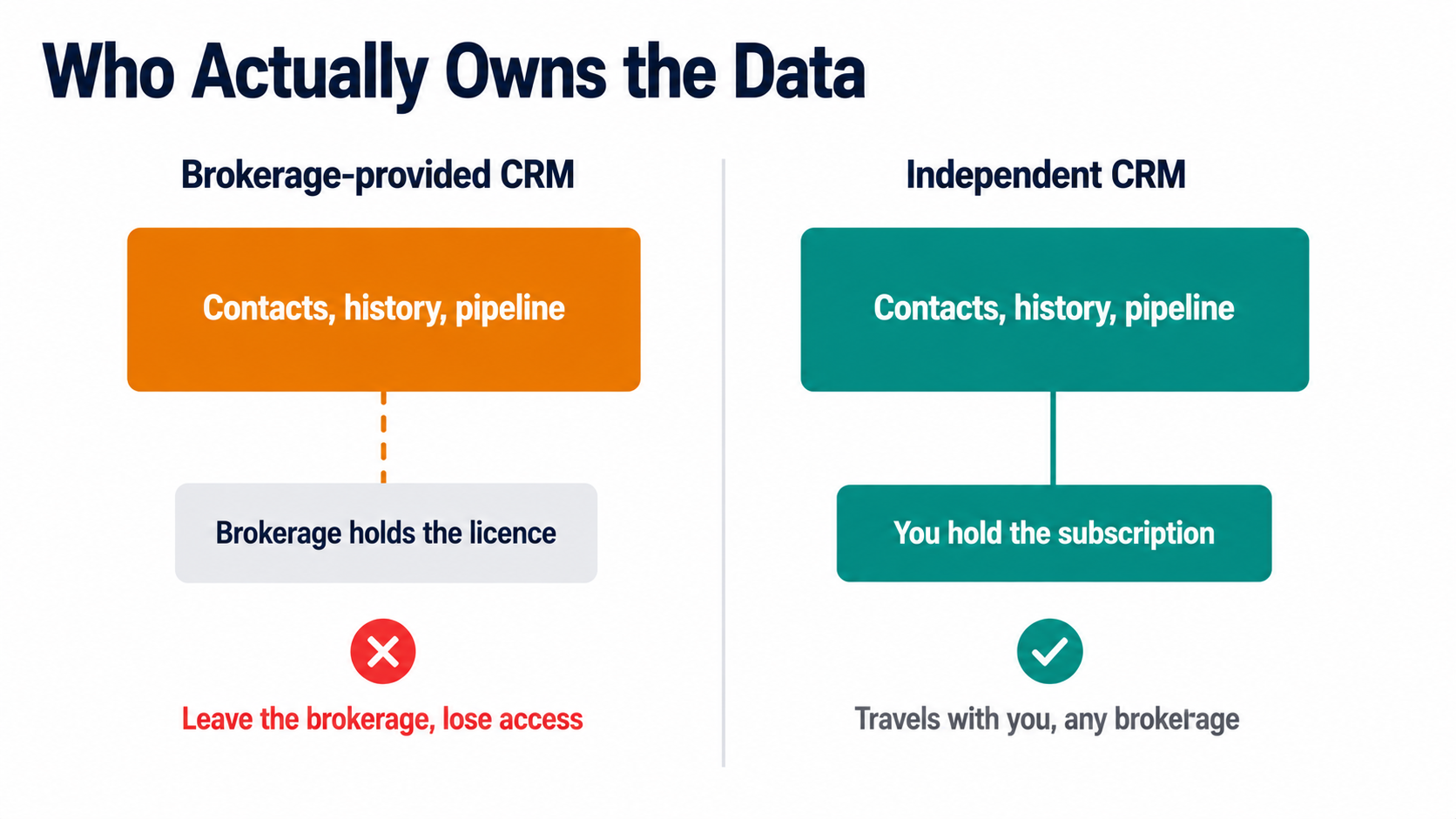
Brokerage-provided CRMs, kvCORE bundled inside an eXp Realty cloud fee, KW Command inside Keller Williams, are typically tied to your brokerage affiliation. Leave the brokerage, and you generally lose access to the contact records, communication history, and pipeline you built inside that system, because the license belonged to the brokerage, not to you.
For an agent who expects to stay at one brokerage for a career, that is a non-issue. For an agent who might move brokerages, and a meaningful share does, it is a real cost that never shows up on a pricing page.
Independent, portable CRMs- Follow Up Boss, Wise Agent, and Top Producer- among them- travel with you regardless of brokerage affiliation, because you hold the subscription and the data personally. Paying for a portable CRM out of your own pocket rather than accepting a free brokerage-bundled one is, in effect, an investment in career flexibility. Weigh that against the real convenience of a bundled system before assuming free is actually cheaper.
The same logic applies to Real Broker specifically, which is worth naming since it comes up often. Real’s proprietary reZEN platform is the transaction and compliance back office, tracking contracts, commission caps, and broker review, and every Real agent uses it for that. It is not, itself, a lead-nurture CRM. Real bundles a Lofty Core account for agents to handle that side, at no separate monthly fee, which is a genuinely good deal, though agents who want a different CRM are free to bring their own rather than being locked into Lofty specifically.
Contract Terms Are the Other Trap
The second thing pricing pages bury: whether you can actually leave.
Sierra Interactive and CINC both require a fixed term, typically twelve months, and their published terms state fees are non-refundable, with CINC specifically requiring you to pay out the remaining balance to exit early. Real Geeks offers six- or twelve-month commitment options rather than a single fixed term. Follow Up Boss, Wise Agent and most CRM-only tools run month to month with no contract at all.
This matters more in real estate than in most CRM categories because these platforms are frequently sold bundled with paid lead generation, and the sales conversation understandably focuses on projected lead volume rather than the exit terms.
Ask directly, before signing, what happens if the tool underperforms in month four. A month-to-month tool costs you one bad month. A twelve-month non-refundable contract costs you a year.
Best CRM Realtor Picks by Where You Are in Your Business
| Stage | Sensible pick | Why |
| New agent, first year | HubSpot Free or Wise Agent | Learn the habit of logging every contact before paying for volume you do not yet have |
| Solo agent, steady deal flow | Wise Agent or Follow Up Boss Grow | Automated drip campaigns without team-management overhead |
| Small team, 2 to 10 agents, buying leads | Follow Up Boss Pro | Lead routing and speed-to-lead reporting across multiple sources |
| Team wanting website plus CRM in one bill | Real Geeks or Lofty | Avoids stitching together a separate IDX site and CRM |
| Brokerage or large team, heavy paid lead spend | kvCORE, BoomTown or CINC | Bundled lead generation at volume, accept the contract terms as the cost of that |
| Agent who just left a brokerage-bundled CRM | Any portable, independent tool | Rebuild ownership of your own contact data going forward |
Automated drip campaigns and lead routing deserve one final word, because they are the two features worth testing directly rather than trusting a spec sheet on. Before committing, send yourself a test lead through whatever public form the tool would capture it from, and time how long it takes to land in front of an agent with a first client follow-up message already queued. That single test tells you more about a real estate CRM’s actual value than any comparison table, including this one.
Frequently Asked Questions
Which CRM is best for real estate, and what should real estate contact management actually include?
There is no single best, because “best” depends entirely on whether you are buying a CRM alone or a CRM bundled with lead generation. For CRM-only, Follow Up Boss is the strongest all-around pick for teams, and Wise Agent is the strongest value pick for solo agents and small teams. For a bundled platform with an IDX website and lead source included, kvCORE, Real Geeks, and Lofty are the names worth comparing, at meaningfully different price points. The genuinely useful filter before comparing further: decide whether you are also buying a website and lead source in this purchase, or handling those separately, because that single decision eliminates half the list either way.
What is the most popular CRM for real estate agents?
Follow Up Boss and kvCORE are the two names that come up most often, for different reasons. Follow Up Boss has broad organic adoption among independent teams specifically because it plugs into over 250 lead sources rather than trying to be one itself, so agents already buying leads from Zillow, Realtor.com, and elsewhere consolidate them there. kvCORE’s popularity comes largely through brokerage-level adoption. Since eXp Realty bundles it into every agent’s cloud brokerage fee, a very large number of agents use kvCORE simply because their brokerage chose it for them, not because they individually selected it, which is worth knowing before treating adoption numbers as a quality signal.
What is the best free CRM software for real estate agents?
HubSpot’s free tier, with the honest caveat that it was not built for real estate specifically. It has no MLS integration, no listing management, and no real estate drip templates, so you are trading category-specific features for zero cost and a genuinely capable general CRM underneath. For a brand new agent with very few contacts and no budget yet, that trade is reasonable, since the habit of consistent follow-up matters more at that stage than automation sophistication. Once deal volume justifies it, migrating to Wise Agent or Follow Up Boss recovers the real-estate-specific features HubSpot’s free tier does not have.
Which CRM does Real Broker use?
Real Broker’s own proprietary platform, reZEN, handles transactions and back-office compliance, and it bundles a free Lofty CRM account for lead nurture, which is a different job. This distinction gets flattened in a lot of coverage that describes reZEN as Real’s CRM, which is not quite accurate. reZEN tracks contract-to-close, commission caps, and broker review. Lofty, bundled at no additional monthly fee, is the tool that actually handles automated drip campaigns and lead follow-up. Agents who prefer a different CRM are not locked into Lofty and can bring Follow Up Boss or Wise Agent instead, though doing so means paying for a second tool on top of what is already included.
How Software Chronicle Researches and Publishes Software Reviews
Software Chronicle is an independent publication covering business and developer software. We check whether a product is still sold before recommending it, which matters unusually often in this specific category, and we flag where a vendor does not publish pricing rather than repeating an outdated figure as current. No software vendor owns us, funds us, or influences our editorial decisions. More about who we are is on our About us page.
Some links in this article are affiliate links, which means we may earn a commission if you purchase through them at no additional cost to you. Those arrangements never affect which tools we include or how we rank them. The specifics are in our affiliate disclosure, and the process behind every comparison is documented in our how we review software page. Real estate CRM pricing, contract terms, and brokerage bundling change frequently, so confirm current terms directly with the vendor and your brokerage before committing. If you spot something out of date or want a platform considered for a future update, contact us.
Najm Us Sahar Fareed is part of the editorial team at Software Chronicle, a group of SaaS researchers and former software buyers who have collectively evaluated over 200 tools across the categories we cover. With 5 years of experience working with digital marketing agencies across North America, she brings a strong background in content strategy and practical software evaluation.
Blog
CRM Integration Guide: Connect Your Tools Without Breaking Your Data
A CRM only earns its licence fee when it becomes the place your team checks first. That happens when the tools around it feed into it automatically, and it stops happening the moment someone has to copy a deal value from an invoice into a custom field by hand. The gap between those two states is integration work, and most of it goes wrong for reasons that have nothing to do with technical difficulty.
The failures are almost always design decisions made too fast. Nobody decided which system owns the email address field, so two of them overwrite each other nightly. Nobody set a matching rule, so the same customer exists three times under slightly different spellings. Nobody checked what happens when a sync fails at 3 am, so a week of leads sits in a queue nobody is watching.
This guide covers the decisions in the order you need to make them. If you are still working out what the underlying system does, start with our explainer on how CRM software works.
Quick Takeaways
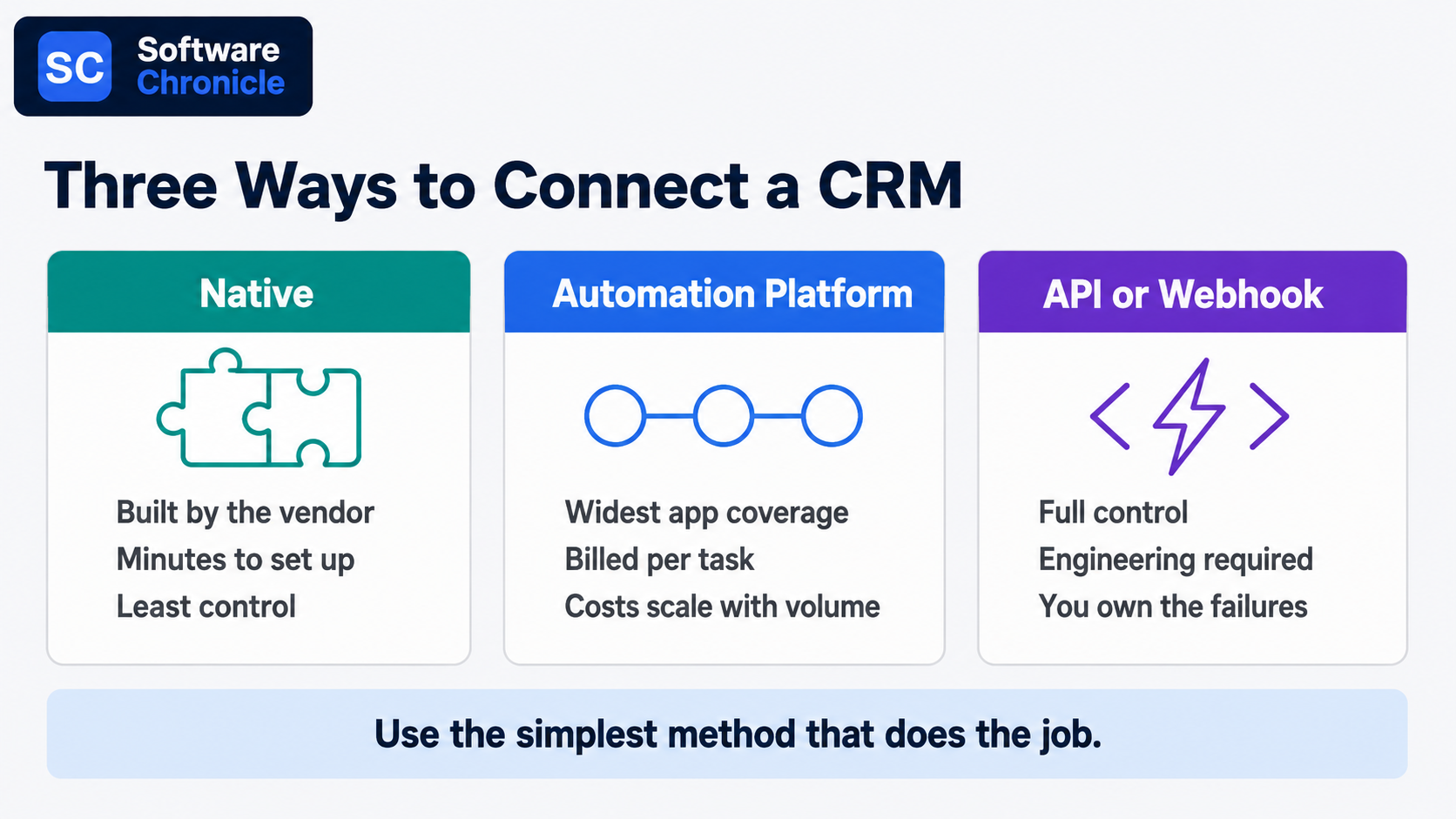
- Three connection methods cover almost everything: native integrations, an automation platform like Zapier or Make, and direct API or webhook work. Use the simplest one that does the job.
- Decide field ownership before you connect anything. One system owns each field, and every other system reads it.
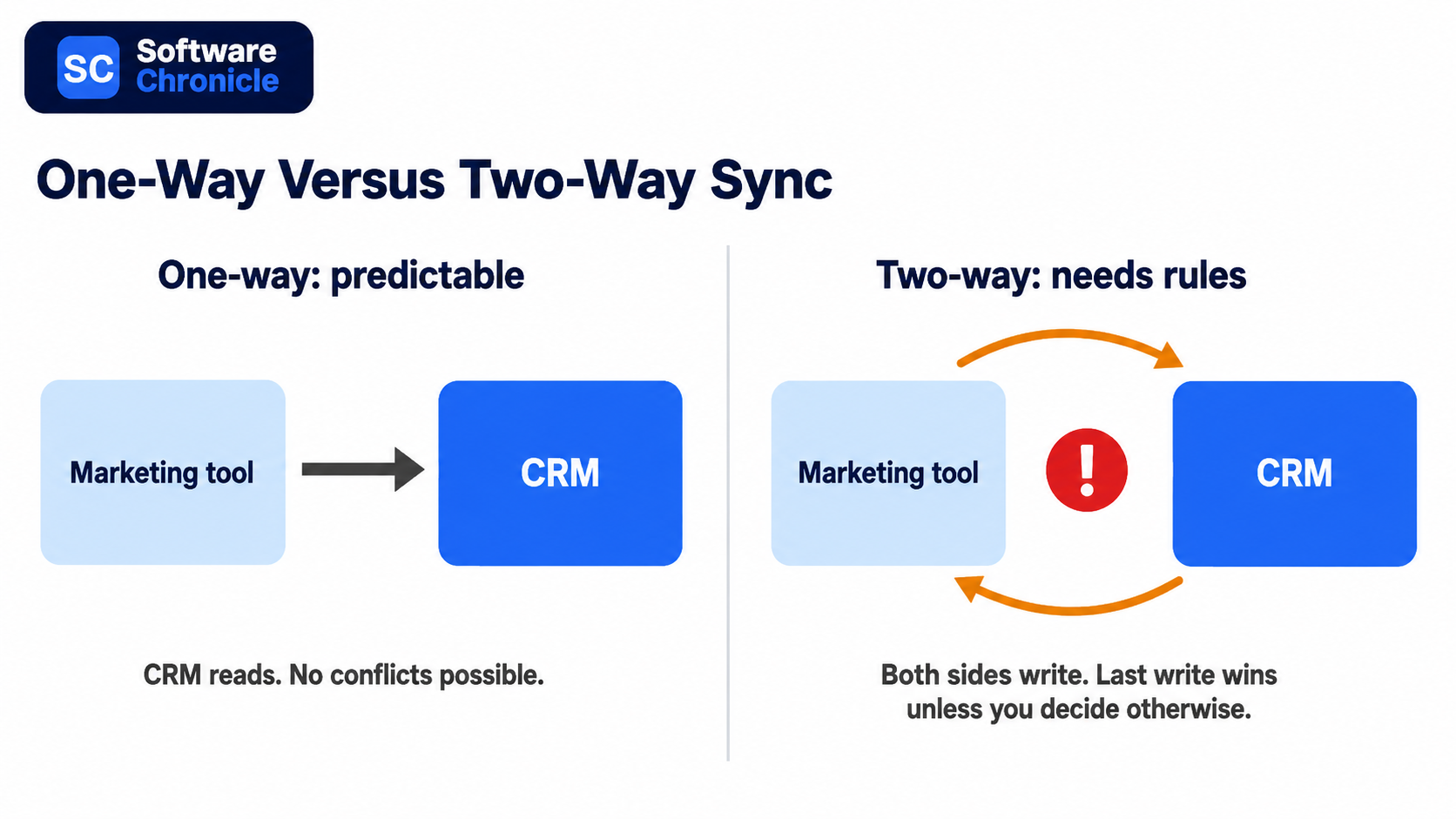
- Bi-directional sync doubles the failure surface. Default to one-way unless both teams genuinely edit the same data.
- Set a matching rule first, usually email address or a unique customer ID. Duplicate records are the single most common integration outcome.
- Marketplace size is a poor buying signal. Salesforce lists thousands more apps than HubSpot, but most teams run ten to fifteen integrations total.
- Task-metered automation platforms bill per action step, not per workflow, so a five-step automation costs five times what the pricing page implies.
- Build monitoring in from day one. Silent sync failures are worse than loud ones because nobody finds them for weeks.
- Phone numbers are becoming an unreliable identifier for messaging integrations. Store a platform-specific ID alongside them.
Three Ways to Connect Anything to a CRM
Every integration decision starts here, and picking the wrong method costs either money or engineering time.
| Method | Best for | Setup effort | Ongoing cost | Main risk |
| Native integration | Common tools your CRM already supports | Minutes | Usually included | Limited field mapping control |
| Automation platform | Connecting tools with no native option | Hours | Metered per task or operation | Costs scale with volume, not value |
| Direct API or webhook | Custom logic, high volume, proprietary systems | Days to weeks | Engineering maintenance | You own every failure mode |
Native integrations should always be your first check. They are built and maintained by the vendors; they usually handle authentication and retries for you, and they cost nothing extra. HubSpot’s marketplace lists over 2,000 apps, and Salesforce’s AppExchange, now rebranded AgentExchange, lists several thousand more.
Neither number should drive your CRM choice, because the marketplace gap matters far less than whether the eight tools you actually use are covered.
Automation platforms fill the gaps. Zapier connects the widest range of apps and is the easiest to learn. Make costs substantially less per unit of work because it bills per operation across a whole scenario rather than per step, and n8n removes platform cost entirely if you are willing to self-host. The right choice depends less on features than on volume, which we will come back to.
Direct API work earns its keep in two situations: when you are moving high volumes where per-task billing becomes absurd, and when the logic is specific enough that no off-the-shelf connector expresses it. Webhooks are the underrated half of this. Instead of polling a system every fifteen minutes asking whether anything changed, you let it push an event to you the moment something does. Faster, cheaper, and less load on both sides.
Decide Sync Direction Before You Connect Anything
This is the section most integration guides skip, and it is where the expensive mistakes live.
One system owns each field
Write down every field that will exist in more than one system, and next to each one, name the single system that owns it. Marketing owns email subscription status. Finance owns invoice amounts. Sales owns deal stage.
The owning system writes; everything else reads. Without this, two integrations end up writing to the same field on different schedules and the value flips back and forth indefinitely, which is a bug that takes weeks to notice and hours to explain.
Bi-directional sync is a commitment, not a feature
Vendors sell two-way sync as the premium option, and sometimes it genuinely is what you need, for example, a CRM and a support desk where both teams legitimately update the same contact details.
But two-way sync means you now need conflict resolution rules for what happens when both sides change the same record between syncs. Most tools resolve this with last-write-wins, which quietly means the system that syncs most often always wins regardless of which team was right. Start one-way. Add the reverse direction only when someone can articulate the specific case that requires it.
Set the matching rule explicitly
Every integration needs to answer “is this the same person?” and the default answers are often wrong. Email address is the usual choice and works well until someone changes jobs. A stable internal customer ID is better where you have one.
Whatever you pick, decide up front what happens when no match is found: create a new record, or hold it for review. Auto-creating is how a clean database becomes 40,000 records with 12,000 duplicates.
The Integrations Most Teams Actually Need
Six connections cover the majority of real value. Build them in roughly this order.
Email. The Gmail or Outlook integration is the one that determines whether reps use the CRM at all, because it removes the manual logging step. Two-way calendar and email sync, with a clear rule about which messages get logged, is table stakes rather than an advanced feature. Check whether your CRM logs email to the contact record automatically or requires a plugin per rep.
Calendar. Meeting booking links that write straight to the CRM as an activity, plus availability that respects the rep’s real calendar. Low effort, immediately visible payoff.
Marketing automation. This is the integration with the most field-ownership traps, because subscription status, lifecycle stage, and lead score all get written by both sides in an unmanaged setup. Whether you need a full automation platform or just email sending is worth settling first, and our comparison of marketing automation versus email marketing covers that distinction.
Slack or Teams. Notifications only, one-way, into channels rather than DMs. The failure mode is volume: alert on deals over a threshold or stage changes on named accounts, not on every record update, or the channel gets muted in a week.
Ecommerce. Shopify or Stripe into the CRM gives you order history and lifetime value on the contact record, which changes how support and sales behave. Match on email, and decide explicitly whether guest checkouts create contacts.
Support desk. Ticket count and open ticket status on the contact record prevent the classic upsell email to a customer with three open complaints. Which of these features your CRM handles natively varies a lot, and our breakdown of the CRM features every business needs is a useful checklist before you buy.
Read Also: Best CRM for B2B Sales Teams
What Integration Actually Costs
The cost trap in this category is not licence price; it is metering.
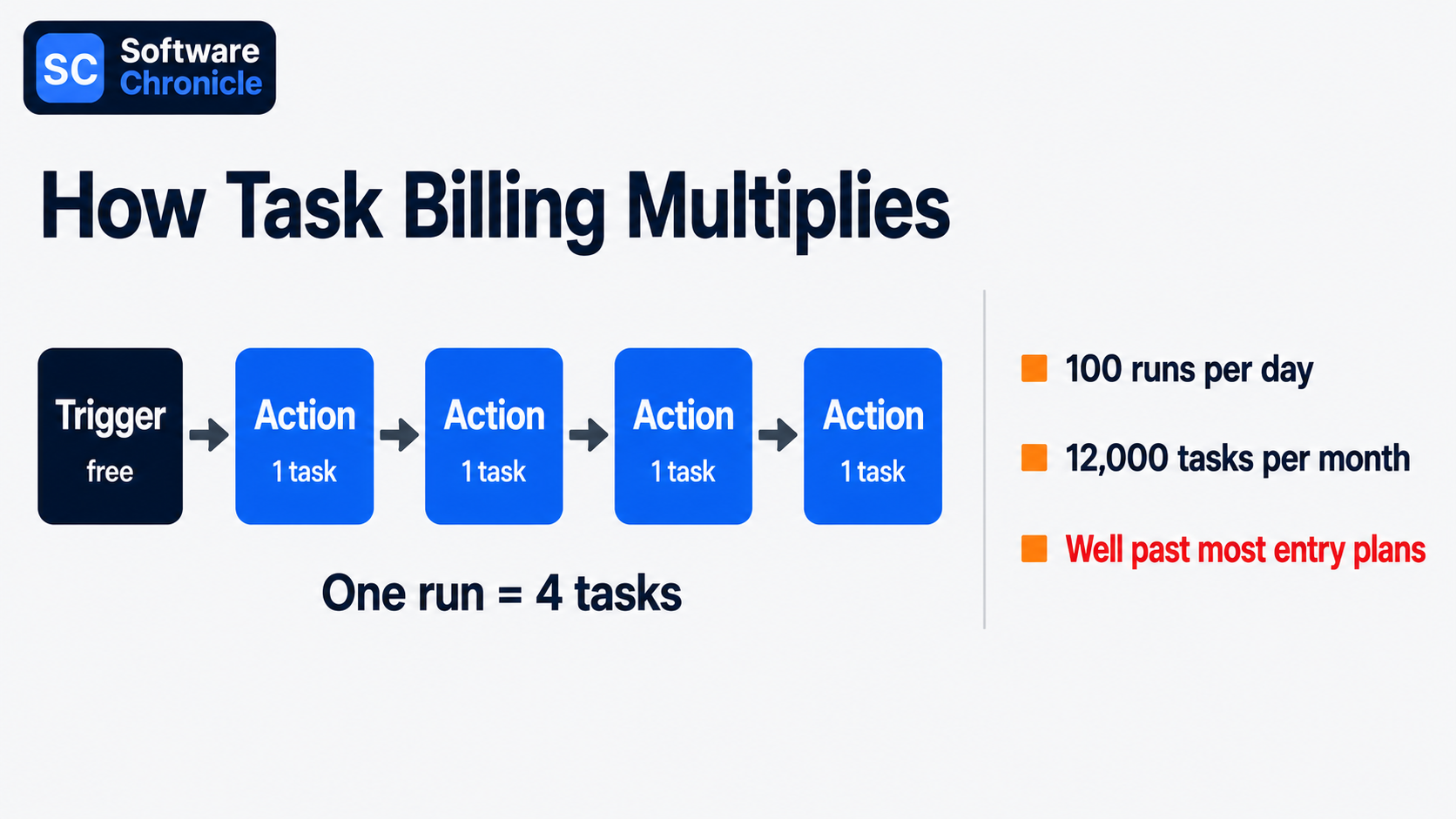
Zapier bills per task, where a task is one completed action step. A workflow with one trigger and four actions consumes four tasks every time it runs, so a modest automation firing 100 times a day burns around 12,000 tasks a month. Its free tier covers 100 tasks, and paid plans start around $20 per month, then scale steeply with volume.
Make counts operations across a scenario instead and offers roughly an order of magnitude more capacity per dollar, which is why teams with high-volume workflows tend to migrate. n8n self-hosted eliminates the meter at the cost of running it yourself.
The practical move before buying: count the action steps in each planned workflow, estimate daily trigger volume, multiply by 30, and compare that number to the plan tiers. That arithmetic, not the headline price, tells you what you will pay.
Also budget for the work nobody quotes. Field mapping, deduplication of the records you already have, testing, and the ongoing maintenance when a vendor changes an API. On a mid-sized CRM rollout, that work reliably exceeds the software cost.
What Breaks, and How to Catch It Early
| Failure | How it shows up | Prevention |
| Duplicate records | Same customer, three spellings | Matching rule set before first sync, plus a monthly dedupe pass |
| Field overwrite loops | A value that keeps flipping | Written field ownership map |
| API rate limits | Partial syncs during busy periods | Batch updates, avoid polling, prefer webhooks |
| Silent failures | Nobody notices for weeks | Alert on sync errors to a channel someone reads |
| Identifier drift | Records stop matching | Store a stable platform ID, not just email or phone |
That last row is becoming more urgent. Meta is rolling out usernames and a business-scoped user ID for WhatsApp, which means webhook payloads will not always contain a phone number. Any CRM integration that matches customers on phone number alone will start silently failing to match.
If you run messaging integrations, store the platform-specific ID alongside the phone number now rather than after records stop connecting.
Frequently Asked Questions
What are CRM integration tools?
They are the connectors that move data between your CRM and the rest of your stack, and they come in three shapes.
Native connectors are built by the CRM vendor or the partner app. Integration platforms such as Zapier, Make, n8n, and Workato sit in the middle and connect anything to anything. Custom API and webhook work is what you build when neither of the first two fits. The one distinction worth knowing at purchase time is between an integration and a sync: a lightweight integration pushes an event once, a sync keeps two records continuously aligned, and syncs are the ones that need ownership rules.
What are the 4 types of CRM?
Operational, analytical, collaborative, and strategic.
Operational CRM automates the sales, marketing, and service workflow. Analytical CRM focuses on reporting and segmentation of customer data. Collaborative CRM shares customer context across departments. Strategic CRM organises the business around long-term customer relationships rather than transactions. The integration angle is what makes this taxonomy practical rather than academic: analytical CRM use cases need complete historical data, so they break first when a sync drops records, while operational use cases mostly need the last 30 days to be right. We go deeper into these categories in our guide to the types of CRM software.
What are tools used in CRM?
A working CRM stack is usually the platform plus five or six satellites. The platform itself (HubSpot, Salesforce, Pipedrive, Zoho CRM), an email and calendar client, a marketing or email tool (Mailchimp, ActiveCampaign, Klaviyo for ecommerce), a chat tool for notifications, a billing or ecommerce system, and often a support desk.
The point worth making is that the count should stay small deliberately. Every additional tool is another sync to maintain, and teams that end up with fifteen connected apps usually have several doing overlapping jobs.
What are the top 3 CRM tools?
By market presence, Salesforce, HubSpot, and Microsoft Dynamics 365, though that ranking rarely answers a real buying question.
More useful is which one integrates cleanly with what you already run. Microsoft-heavy organisations get the least integration friction from Dynamics. Teams whose marketing and sales sit on one team tend to find HubSpot’s single-database design removes an entire class of sync problems. Salesforce wins where the requirement is customisation depth, and there is an admin to maintain it. Pipedrive and Zoho both belong on a smaller team’s shortlist and get left off these lists for reasons of size rather than fit.
Is Excel a CRM tool?
No, though it functions as one for a while, and that is precisely the trap.
A spreadsheet can hold contacts, deal stages, and next steps perfectly well. What it cannot do is log activity automatically, prevent two people from overwriting each other, enforce required fields, trigger a follow-up, or connect to your inbox so email history attaches itself to the record. The tell that you have outgrown it is usually not size but disagreement: when two people quote different numbers from the same file, the spreadsheet has stopped being a source of truth. Migrating early is much easier than migrating a file that has grown 40 columns of inconsistent formatting.
Is WhatsApp a CRM tool?
No. It is a messaging channel that integrates with a CRM, and the distinction has real cost implications.
The consumer WhatsApp Business app has no automation and no CRM connection. The WhatsApp Business Platform does, but you connect it either through Meta’s Cloud API directly or through a provider such as Twilio or 360dialog, and since July 2025, Meta bills per delivered template message rather than per conversation, with replies inside the 24-hour customer service window free. Two things to plan for: your bill scales with outbound message volume rather than seats, and the identifier change noted above means you should store the platform’s own user ID against each contact rather than relying on phone number matching.
How Software Chronicle Researches and Publishes Software Reviews
Software Chronicle is an independent publication covering business and developer software. We work from vendor documentation, published pricing verified at the time of writing, and primary research, and we say plainly when a category has no single right answer rather than manufacturing a winner. No software vendor owns us, funds us, or influences our editorial decisions. More about who we are is on our About Us page.
Some links in this article are affiliate links, which means we may earn a commission if you purchase through them at no additional cost to you. Those arrangements never affect which tools we include or how we rank them. The specifics are in our affiliate disclosure, and the process behind every comparison is documented in our review methodology. Integration pricing changes frequently, so confirm current rates with the vendor before committing. If you spot something out of date or want a tool considered for a future update, contact us.
Najm Us Sahar Fareed is part of the editorial team at Software Chronicle, a group of SaaS researchers and former software buyers who have collectively evaluated over 200 tools across the categories we cover. With 5 years of experience working with digital marketing agencies across North America, she brings a strong background in content strategy and practical software evaluation.
- CRM for Freelancers: Do You Really Need One?
- CRM for Real Estate Agents: Best Options

- CRM Integration Guide: Connect Your Tools Without Breaking Your Data
- CRM Pricing Guide: What Does CRM Software Actually Cost? (2026)

- Task Management vs Project Management: What’s the Difference?

- Project Management Methodologies: Agile vs. Scrum vs. Kanban vs. Waterfall
- Gantt Chart Software: Do You Need It? (An Honest Answer)

- CRM + Marketing Automation: How They Work Together

-

 Blog5 months ago
What Is Accounting Software? The Complete SMB Guide to Managing Finances
-
 Blog4 months ago
11 Best No-Code App Builders for Business in 2026
-

 Blog3 months ago
How to Choose Accounting Software for Your Business: The Ultimate Buyer’s Guide
-

 Blog3 months ago
How to Choose Project Management Software: A No-Nonsense Buying Guide for 2026
-

 Blog2 months ago
How to Choose Customer Support Software (Without Regretting It in Six Months)
-
 Blog4 months ago
9 Best No-Code Website Builders in 2026
-
 Blog4 months ago
11 Agile Project Management Tools — Full Guide for Modern Teams (2026)
-
 AI Tools4 months ago
9 Best AI Writing Tools for Content Teams in 2026