
AI Tools
The Main Types of AI Tools Businesses Are Using Today
Artificial intelligence is no longer a niche technology used only by large tech companies. Today, businesses of all sizes are using AI tools to improve productivity, automate repetitive work, create content, analyze data, support customers, and streamline operations.
The challenge is that the AI software landscape has become incredibly broad. There are now dozens of different types of AI tools for business, and many companies struggle to understand which categories actually matter for their workflows.
Some AI tools focus on writing and content creation. Others specialize in image generation, coding, analytics, customer support, SEO, video production, or automation. While many platforms appear similar on the surface, they are often built to solve very different operational problems.
This is why understanding the main categories of AI tools has become increasingly important. Businesses that adopt the right AI systems can improve efficiency, reduce manual workload, and scale faster. Businesses that adopt the wrong tools often end up with unnecessary complexity, overlapping software, and poor adoption across teams.
In this guide, we will break down the major AI software types, explain what each category actually does, and help you understand which different kinds of AI tools are most relevant for modern business operations.
What Are AI Tools?
AI tools are software systems designed to perform tasks that normally require human intelligence. These tools use technologies like machine learning, natural language processing, computer vision, and automation to assist with decision-making, content creation, analysis, communication, and operational workflows.
Today, the range of AI software types available to businesses has expanded rapidly. Some tools specialize in generating content, while others focus on automation, analytics, coding, customer service, or design.
Instead of being limited to one department, AI is now influencing operations across marketing, sales, support, development, finance, and productivity workflows.
How AI Software Is Changing Modern Business
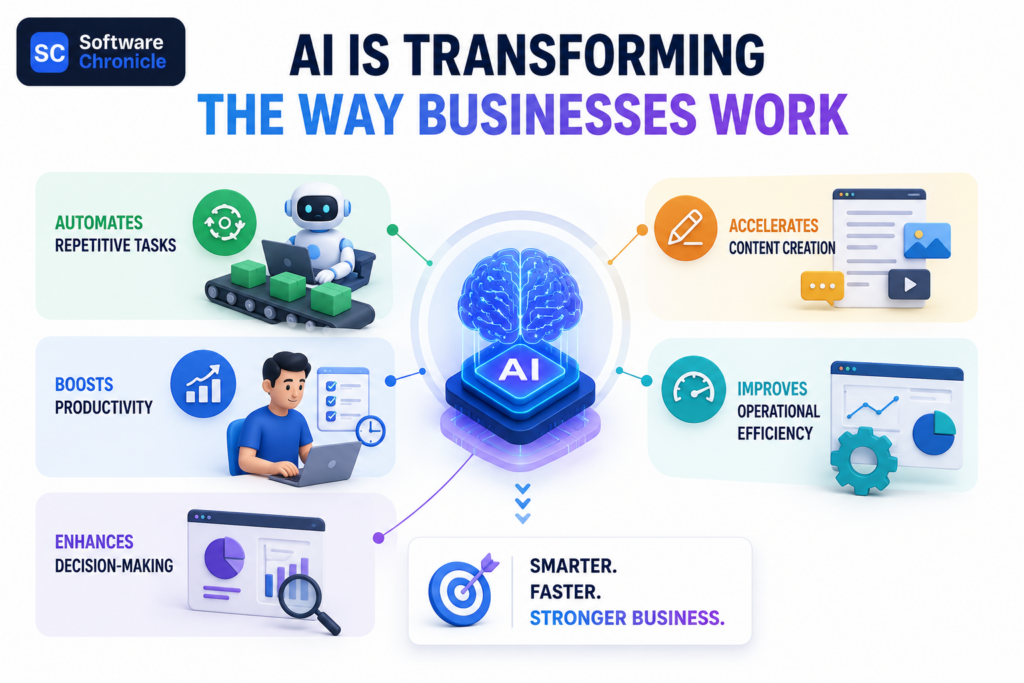
AI tools are reshaping how businesses operate on a daily basis.
One of the biggest impacts is automation. Businesses are increasingly using AI to reduce repetitive manual work, streamline workflows, and improve operational speed.
AI is also improving productivity across teams. Tasks that previously required hours of manual effort, such as writing drafts, summarizing information, generating visuals, or analyzing data, can now be completed significantly faster.
Decision-making is another area where AI is becoming increasingly valuable. Analytics AI tools can process large amounts of information, identify patterns, and surface insights that help businesses make smarter operational and strategic decisions.
Content creation has also changed dramatically. Writing AI, image generation AI, video AI, and design AI tools are allowing businesses to produce creative assets faster and at lower production costs.
Ultimately, many businesses are adopting AI because it improves operational efficiency. The goal is not simply to use AI for the sake of innovation. The goal is to remove bottlenecks, improve workflows, and increase output without scaling operational complexity at the same pace.
Why AI Tool Categories are Important
One of the biggest misconceptions about AI software is assuming that all AI tools solve the same problems.
In reality, the modern AI ecosystem is highly specialized. Different categories of AI tools are designed for completely different operational functions. A writing AI platform serves a very different purpose than an analytics AI system or a coding AI assistant.
This distinction matters because many businesses purchase AI tools without fully understanding their actual use cases. As a result, companies often end up with:
- Overlapping software
- Poor adoption across teams
- Unclear ROI
- Workflow inefficiencies
- Tool overload
AI tools should support existing workflows rather than complicate them.
The most successful AI implementations usually happen when businesses identify a specific operational problem first, then choose an AI tool category designed to solve that problem directly.
Understanding the major categories of AI tools creates clarity and helps businesses make smarter software decisions.
The 10 Main Categories of AI Tools
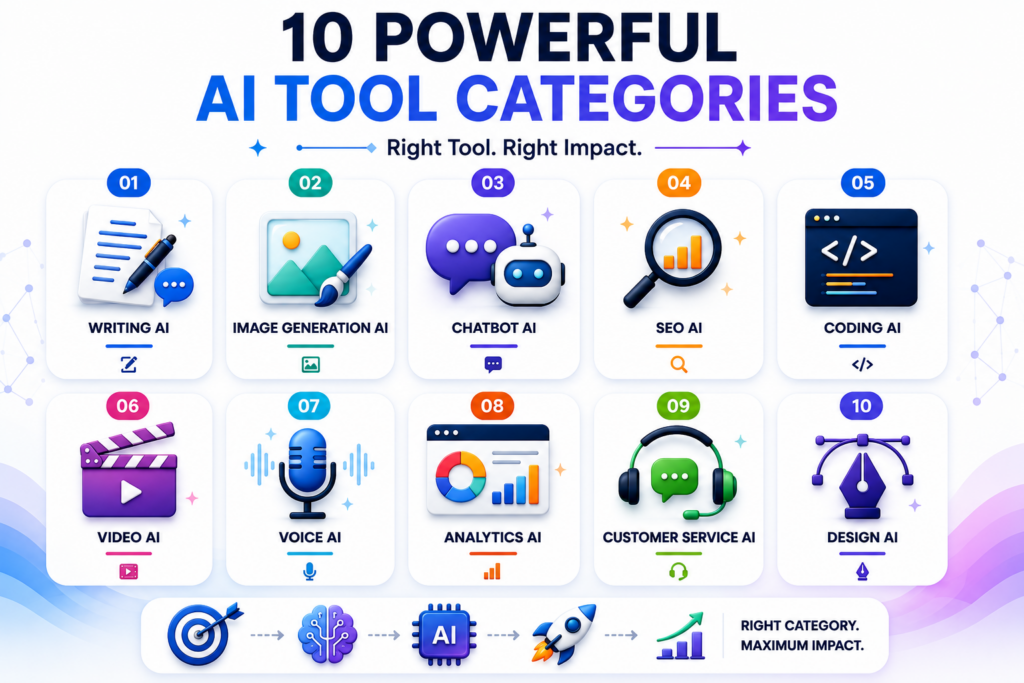
The AI software landscape now includes many specialized categories, each designed for different business functions.
Some of the most important types of AI tools for business include:
- Writing AI for content creation, communication, and copywriting
- Image generation AI for creating visuals and marketing creatives
- Chatbot AI for conversational assistance and automation
- SEO AI for search optimization and content strategy
- Coding AI for software development and code assistance
- Video AI for video generation and editing
- Voice AI for speech generation and voice automation
- Analytics AI for reporting, forecasting, and insights
- Customer service AI for support automation and ticket handling
- Design AI for presentations, layouts, and creative production
Each category serves a different role within modern business operations.
Writing AI Tools
What Writing AI Software Does
Writing AI tools are designed to generate, edit, and improve written content using natural language processing models.
These platforms are commonly used for:
- Content generation
- Email writing
- Summaries and documentation
- Brainstorming ideas
- Editing and rewriting
Some writing AI tools specialize in marketing copy, while others focus more heavily on research, productivity, or conversational workflows.
Because communication plays a role in nearly every department, writing AI has become one of the fastest-growing categories of AI software.
Where Writing AI Works Best
Writing AI tools provide the most value in workflows that require high volumes of communication or content production.
They are commonly used by:
- Marketing teams
- Content creators
- Agencies
- Sales teams
- Internal business communication teams
Businesses often use these systems to accelerate first drafts, generate ideas faster, and improve overall production efficiency.
Limitations of Writing AI
Despite their capabilities, writing AI tools still have important limitations.
Accuracy concerns
AI-generated information may sometimes contain factual errors or misleading outputs.
Generic content
Without proper prompting and editing, outputs can feel repetitive or lacking in originality.
Human oversight is still necessary
Strong editing, strategy, and contextual understanding are still essential for high-quality business communication.
Writing AI improves speed significantly, but it does not completely replace human judgment.
Popular Writing AI Tools
Some widely used writing AI platforms include:
These tools are commonly used across marketing, operations, research, and business communication workflows.
Image Generation AI Tools
What Image AI Tools Do
Image generation AI platforms create visuals using text prompts or reference inputs.
Businesses use these tools for:
- Marketing creatives
- Product concepts
- Social media graphics
- Advertising visuals
- Branding assets
This category of AI software has grown rapidly because it dramatically reduces the time required for visual content production.
Common Business Uses
Image AI tools are now heavily integrated into:
- Social media marketing
- Branding workflows
- Advertising campaigns
- E-commerce creative production
- Product visualization
For many businesses, image generation AI accelerates creative experimentation and content scaling.
Challenges and Limitations
While image AI is powerful, businesses still face several challenges.
Brand consistency
AI-generated visuals may not always align perfectly with brand guidelines.
Copyright concerns
Questions around ownership, licensing, and training data remain ongoing industry discussions.
Prompt dependency
Output quality depends heavily on prompt quality and creative direction Human creative oversight remains critical for professional brand execution.
Popular Image AI Platforms
Leading image generation AI platforms include:
These tools are widely used across marketing, design, and creative production teams.
Video AI Tools
What Video AI Software Does
Video AI tools help businesses create and edit video content faster using automation and generative AI.
Common capabilities include:
- AI video generation
- Video editing assistance
- AI avatar videos
- Short-form content production
- Script-to-video workflows
This category has expanded rapidly due to increasing demand for video-based content across digital platforms.
Why Video AI Is Growing Quickly
Several factors are driving the growth of video AI software.
Businesses are facing:
- Higher content demand
- Faster publishing cycles
- Growing short-form video consumption
- Pressure to reduce production costs
AI tools help teams create more video content without requiring traditional production resources for every project.
Popular Video AI Tools
Popular video AI platforms include:
These tools are commonly used for marketing, training content, social media, and internal communication.
Design AI Tools
What Design AI Platforms Do
Design AI tools help automate and accelerate visual design workflows.
These systems are commonly used for:
- Presentation design
- Layout generation
- UI concepts
- Brand assets
- Creative formatting
Rather than replacing designers entirely, most design AI tools function as productivity accelerators for creative teams.
Where Design AI Helps Businesses
Design AI tools are especially useful for:
- Marketing teams
- Startups with limited design resources
- Internal operations teams
- Faster creative production workflows
They help businesses reduce turnaround times for presentations, campaigns, and visual communication assets.
Popular Design AI Tools
Some widely used design AI platforms include:
These tools are increasingly becoming part of everyday creative and operational workflows across modern businesses.
Chatbot AI Tools
What AI Chatbots Do
Chatbot AI tools are designed to simulate human-like conversations and assist users through text or voice interactions.
Modern AI chatbots can handle a wide range of tasks including:
- Conversational support
- Internal assistance for teams
- FAQ automation
- Knowledge retrieval
- Customer interaction workflows
Unlike traditional rule-based chat systems, modern chatbot AI platforms can understand context, generate dynamic responses, and adapt conversations more naturally.
Many businesses now use chatbots as operational assistants rather than simple support widgets.
Business Uses for Chatbots
AI chatbots are being used across many different business functions.
Some of the most common use cases include:
- Website support and engagement
- Lead generation workflows
- Customer support automation
- Internal employee assistance
- Knowledge base interaction
- Scheduling and communication support
As conversational AI continues improving, chatbot platforms are becoming more deeply integrated into everyday operations.
Popular Chatbot AI Platforms
Some widely used chatbot AI platforms include:
These systems are commonly used for customer interaction, operational support, and productivity workflows.
Customer Service AI Tools
How Customer Service AI Works
Customer service AI tools focus specifically on automating and improving support operations.
These systems commonly handle:
- Ticket automation
- AI-powered support agents
- Response suggestions
- Workflow routing
- Support summarization
- Automated customer communication
Many platforms combine conversational AI with workflow automation to reduce manual support workload.
Some systems can now resolve basic customer requests entirely without human intervention.
Why Businesses Are Investing in Customer Service AI
Customer support operations can become expensive and difficult to scale manually.
This is one of the biggest reasons businesses are rapidly investing in customer service AI platforms.
Key advantages include:
- Faster support response times
- Lower operational support costs
- 24/7 customer availability
- Improved ticket management
- Reduced repetitive workload for human teams
For many businesses, customer service AI improves both operational efficiency and customer experience simultaneously.
Popular Customer Service AI Platforms
Popular customer service AI tools include:
These systems are widely used across support teams, SaaS companies, and e-commerce operations.
Coding AI Tools
What Coding AI Tools Do
Coding AI tools assist developers with software engineering workflows using machine learning and large language models.
These systems can help with:
- Code generation
- Debugging assistance
- Documentation creation
- Code completion
- Refactoring suggestions
- Technical explanations
Coding AI has become one of the fastest-growing categories of AI software because it directly improves development speed and productivity.
Best Use Cases
Coding AI tools are especially valuable for:
- Developers
- SaaS teams
- Technical startups
- Product engineering teams
- Internal automation workflows
Many development teams now use coding AI as a productivity layer rather than a replacement for engineers.
Important Limitations
Despite rapid improvement, coding AI still has important limitations.
Code reliability
Generated code may contain errors, inefficiencies, or incomplete logic.
Security review
AI-generated code still requires security evaluation and validation.
Human oversight remains critical
Developers still need to review architecture decisions, scalability considerations, and production reliability.
Coding AI accelerates workflows, but it does not eliminate the need for engineering expertise.
Popular Coding AI Tools
Some of the most popular coding AI platforms include:
These tools are increasingly integrated into modern software development environments.
You may also want to know: What Is DevOps Software? A Complete Guide for Modern Engineering Teams
Analytics AI Tools
What Analytics AI Software Does
Analytics AI tools help businesses process and interpret large amounts of data more efficiently.
These systems are commonly used for:
- Data interpretation
- Forecasting
- Reporting automation
- Pattern detection
- Trend analysis
- Predictive insights
Instead of manually analyzing spreadsheets or dashboards, businesses can use AI systems to surface insights faster and identify patterns that may otherwise go unnoticed.
Why Analytics AI Is Becoming Important
Data volumes are increasing rapidly across nearly every industry.
As businesses collect more operational, financial, marketing, and customer data, manual analysis becomes increasingly difficult to scale.
Analytics AI helps organizations by providing:
- Faster insights
- Better decision-making support
- Predictive analysis capabilities
- Improved operational visibility
- Automated reporting workflows
This category of AI software is becoming especially important for companies prioritizing data-driven operations.
Common Business Applications
Analytics AI tools are widely used across:
- Sales forecasting
- Customer behavior analysis
- Operational optimization
- Financial reporting
- Marketing performance tracking
- Business intelligence workflows
The goal is not just collecting data, but turning that data into actionable operational insights.
Popular Analytics AI Platforms
Popular analytics AI platforms include:
These systems are commonly used for business intelligence and operational analytics.
SEO AI Tools
What SEO AI Tools Do
SEO AI tools help businesses improve search visibility and optimize content strategies using automation and AI-driven analysis.
These systems commonly support:
- Keyword research
- Content optimization
- SERP analysis
- Technical SEO assistance
- Search intent analysis
- Content structure recommendations
SEO AI has become increasingly important as search engines and content ecosystems grow more competitive.
Why SEO AI Tools Are Growing
Several trends are driving the growth of SEO AI software.
Search complexity
Modern search ecosystems are far more competitive and data-driven than before.
AI-generated search experiences
Search engines are increasingly integrating AI summaries and conversational search experiences.
Content scaling
Businesses are producing more content than ever, increasing the need for optimization support and workflow efficiency.
As a result, SEO AI tools are becoming part of many modern content operations.
Limitations of SEO AI
Despite their usefulness, SEO AI tools still require strategic oversight.
Generic content risk
Over-automated optimization can create repetitive or low-value content.
Human strategy still matters
SEO success still depends heavily on positioning, audience understanding, and content quality.
Search intent is critical
AI tools may not fully understand nuanced search intent or brand positioning requirements.
SEO AI improves efficiency, but a strong strategy remains essential.
Popular SEO AI Platforms
Some widely used SEO AI platforms include:
These systems are commonly used for content optimization and search strategy support.
Voice AI Tools
What Voice AI Software Does
Voice AI tools focus on speech generation, voice automation, and audio-based AI interactions.
These systems can support:
- Voice generation
- Speech recognition
- AI narration
- Voice assistants
- Audio transcription
- Synthetic voice creation
Advancements in voice AI have significantly improved realism and natural conversational quality.
Business Uses
Voice AI tools are being adopted across many industries for:
- Content creation
- Customer support automation
- Accessibility solutions
- Voice assistants
- Audio production
- Training and educational content
As audio and conversational experiences continue growing, voice AI is becoming increasingly integrated into customer and operational workflows.
Popular Voice AI Platforms
Popular voice AI platforms include:
These systems are widely used for narration, automation, and AI-powered audio production.
Why Businesses Often Choose the Wrong AI Tools
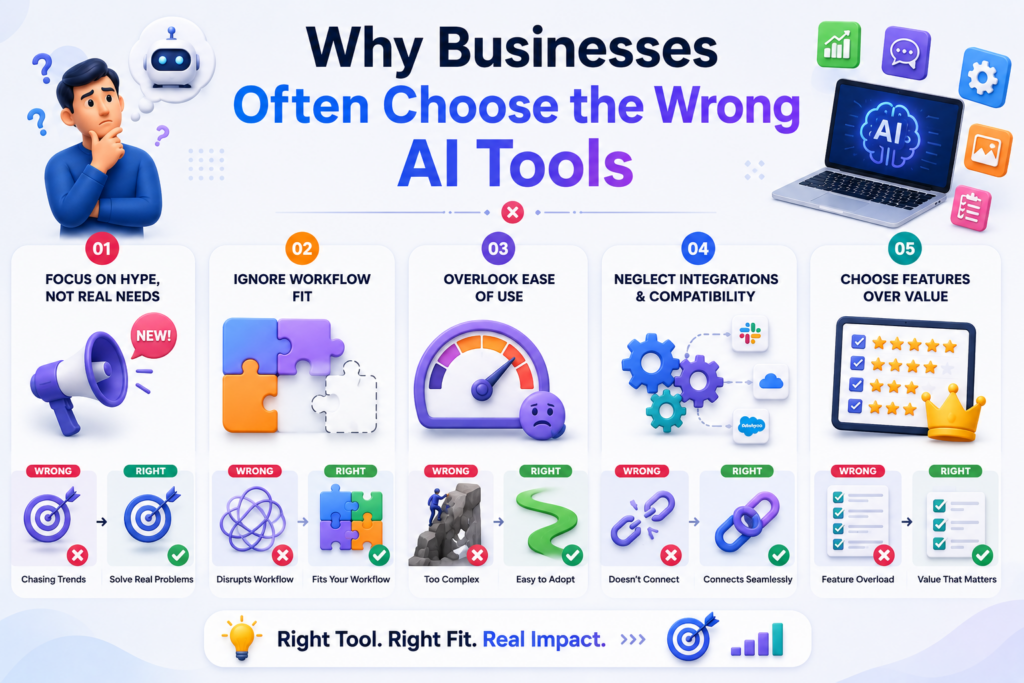
One of the biggest mistakes businesses make with AI adoption is buying tools based on hype instead of operational needs.
Many companies adopt AI platforms simply because they are trending, without fully understanding whether the tool actually fits their workflows or solves a meaningful business problem.
This often leads to:
- Overlapping tool stacks
- Unclear ROI
- Poor adoption across teams
- Workflow fragmentation
- Increased operational complexity
Another common issue is chasing features instead of outcomes. Businesses focus heavily on capabilities, but fail to evaluate whether those capabilities improve real operational efficiency.
An important insight here is that AI tools should reduce friction, not create more complexity.
The best AI implementations usually happen when companies start with a specific operational bottleneck and choose a tool category designed to solve that problem directly.
Most Businesses Do Not Need Every Type of AI Tool
As the AI software market expands, many businesses feel pressure to adopt multiple AI systems at once.
In reality, most companies do not need every category of AI tool.
A smarter approach is to:
- Start with operational bottlenecks
- Focus on measurable ROI
- Avoid unnecessary tool overload
- Prioritize workflow improvement first
For example, a business struggling with content production may benefit more from writing AI than from investing heavily in analytics AI or coding assistants.
AI adoption should be strategic rather than trend-driven.
The goal is not to build the largest AI stack possible. The goal is to improve efficiency, productivity, and operational clarity.
The Rise of AI Tool Ecosystems
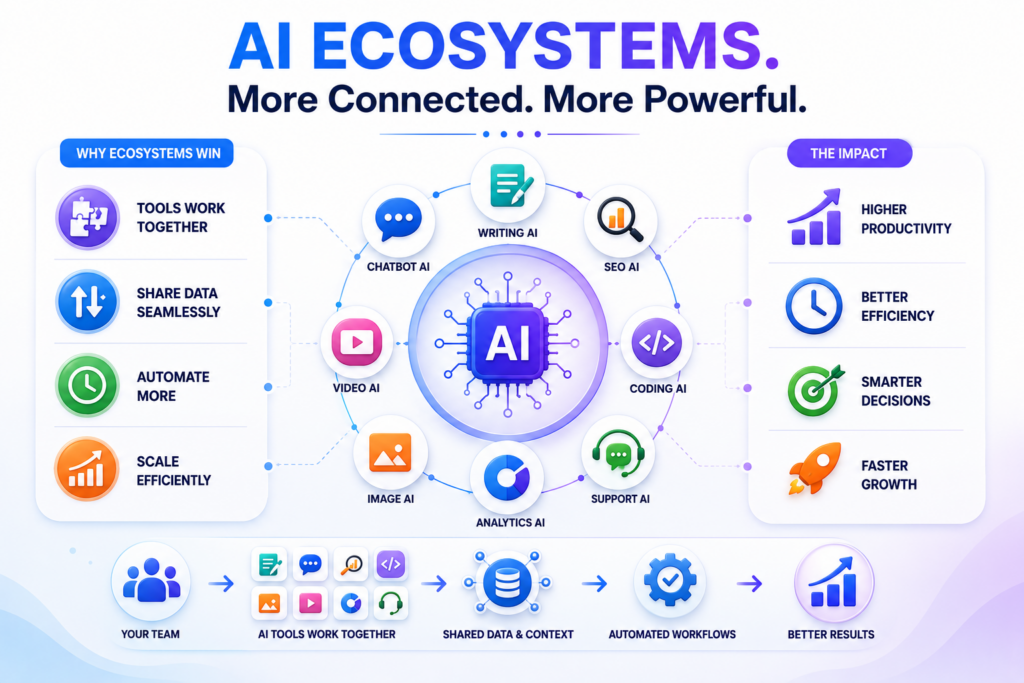
Another major trend reshaping the industry is the rise of integrated AI ecosystems.
Instead of businesses using isolated AI platforms for separate tasks, many modern systems are becoming increasingly multi-functional.
AI assistants are now combining capabilities across:
- Writing
- Research
- Coding
- Automation
- Design
- Analytics
For example:
- ChatGPT now supports writing, coding, research, and workflow assistance
- Canva has expanded heavily into AI-powered design workflows
- CRM platforms are increasingly embedding AI automation features directly into customer workflows
This shift is gradually reducing the need for fragmented AI stacks and moving businesses toward more centralized AI operational environments.
Which Type of AI Tool Does Your Business Actually Need?
One of the biggest mistakes businesses make with AI adoption is trying to implement too many tools at once.
The better approach is to identify the specific operational problem you want to improve, then choose the AI category designed to solve that problem most effectively.
Here is a simple decision framework:
| Business Need | Best AI Tool Category |
| Content creation | Writing AI |
| Design and visuals | Image & Design AI |
| Support automation | Customer Service AI |
| Coding assistance | Coding AI |
| Marketing optimization | SEO AI |
| Data insights and forecasting | Analytics AI |
| Communication automation | Chatbot AI |
| Audio and video creation | Voice & Video AI |
The goal is not to build the largest AI stack possible. The goal is to improve efficiency in the areas where operational friction already exists.
Many businesses see better results by starting small, solving one bottleneck effectively, and expanding AI adoption gradually over time.
How to Evaluate AI Tools Before Buying
As the number of AI platforms continues growing, choosing the right software is becoming more difficult. Many tools appear impressive during demos but fail to integrate effectively into real business workflows.
Before adopting any AI platform, businesses should evaluate several key factors carefully.
Ease of Use
If teams struggle to use the platform consistently, adoption will drop quickly regardless of how advanced the technology is.
Workflow Compatibility
AI tools should support existing operational workflows rather than forcing teams into unnecessary process changes.
Integration Capabilities
Strong integrations with existing systems such as CRM platforms, communication tools, analytics software, and operational systems are increasingly important.
Output Quality
AI-generated content, insights, or automation should consistently meet acceptable business quality standards.
Scalability
The platform should support future operational growth without creating workflow bottlenecks later.
Pricing vs ROI
Businesses should evaluate whether the productivity gains and operational improvements justify the software investment.
In many situations, simpler AI tools with strong workflow alignment outperform more complex systems with excessive functionality.
AI Software Categories in The Upcoming Days
AI software is evolving rapidly beyond isolated productivity tools into more connected operational ecosystems.
Some of the biggest trends shaping the future include:
- AI agents capable of handling multi-step operational tasks independently
- Multi-modal AI combining text, image, audio, video, and data understanding in one system
- Autonomous workflows that automate larger business processes with minimal manual intervention
- AI operating systems acting as centralized intelligence layers across business operations
- AI copilots integrated everywhere within CRM systems, productivity tools, analytics platforms, and communication software
The AI landscape is moving toward systems that are increasingly integrated, context-aware, and operationally embedded across entire organizations.
Key Takeaways
- AI software categories are expanding rapidly across every business function
- Successful AI adoption is about operational value, not hype or trends
- The best AI tools improve workflows and reduce operational friction
- Strong AI systems help save time and increase productivity
- AI should support better business decision-making, not add complexity
- Simplicity and team adoption often matter more than feature overload
- Businesses do not need AI everywhere, only where it creates meaningful impact
Making Smarter Decisions in the AI Software Landscape
At Software Chronicle, the focus is on helping businesses navigate rapidly evolving software categories with practical, business-focused insights. Instead of evaluating AI tools purely based on trends or marketing claims, we focus on how these platforms perform within real operational workflows.
Our evaluations prioritize usability, scalability, workflow compatibility, integrations, and long-term operational value.
Our affiliate disclosure policy explains how recommendations may be supported while maintaining editorial independence and objectivity.
If you are still unsure which AI software categories are actually relevant to your operations, the next step is identifying the workflows where AI can create the biggest impact.
Contact us to better understand which AI tools align with your business goals, operational structure, and growth strategy.

Najm Us Sahar Fareed is part of the editorial team at Software Chronicle, a group of SaaS researchers and former software buyers who have collectively evaluated over 200 tools across the categories we cover. With 5 years of experience working with digital marketing agencies across North America, she brings a strong background in content strategy and practical software evaluation.
AI Tools
AI Tools for Small Business: Where to Actually Start (2026)
Most small business owners are not asking whether to use AI anymore. They are staring at a dozen tabs, each one promising to be “the AI tool your business needs,” and closing the laptop no closer to an answer than when they opened it.
That confusion is the actual barrier now, not access or cost. The U.S. Chamber of Commerce’s 2026 small business report found that most small business leaders believe AI will help their daily work, and the real challenge has shifted from availability to moving past experimentation into structured use. Forbes Advisor’s own AI research backs this up from the broader business side: nearly three out of four businesses have started using AI for at least one business function, with half using it for two or more.
This guide is the starting point that cuts through the noise: which AI tools actually save a small business time today, in plain categories, with the honest limits included.
Quick Takeaways
- Nearly 3 in 4 businesses now use AI for at least one function, and half use it for two or more, according to Forbes Advisor.
- The U.S. Chamber of Commerce found small businesses see AI’s biggest current value in saving time, cutting costs, and finding new opportunities, with the shift from “experimentation to adoption” identified as the key next step.
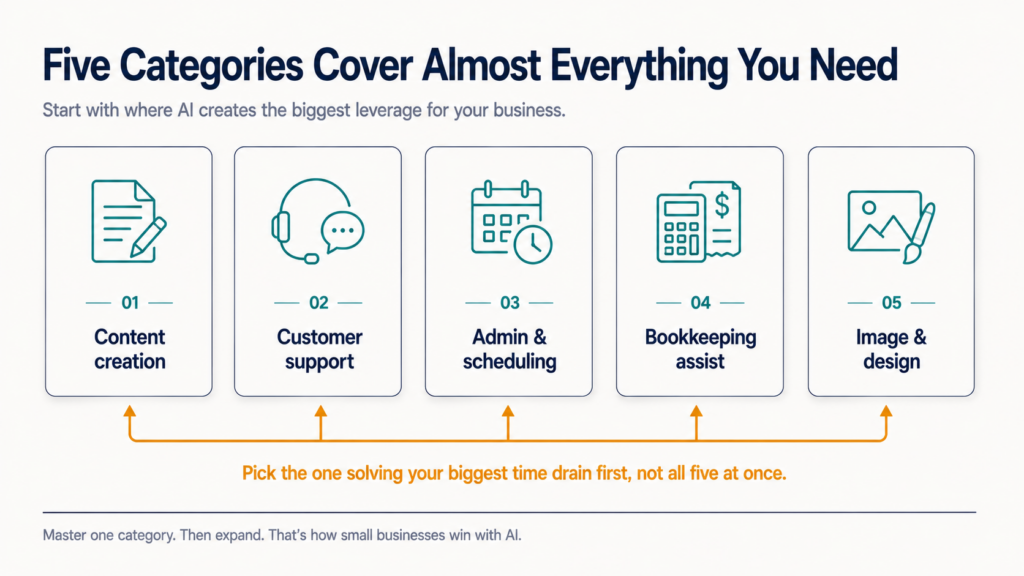
- Five categories cover almost everything a small business actually needs to start: content creation, customer support, admin and scheduling, bookkeeping assistance, and image or design generation.
- Free plans are genuinely usable starting points across every category below; the upgrade decision should wait until a specific limit (volume, features, or quality) actually gets hit.
- No AI tool replaces judgment on pricing, legal, financial, or hiring decisions. Treat AI output in those areas as a draft to review, never a final answer.
The 5 Categories Worth Starting With
Nearly every practical AI use case for a small business falls into one of five categories: content creation, customer support, admin and scheduling, bookkeeping assistance, and image or design generation, and starting with the category matching your single biggest time drain beats trying all five at once.
| Category | What It Actually Does | Free Plan Available? | Best Starting Tool |
| Content creation | Drafts blog posts, social captions, product descriptions, emails | Yes | ChatGPT, Claude |
| Customer support | Answers common questions, drafts replies, routes tickets | Yes (capped) | Freshdesk Free, Intercom Fin trial |
| Admin & scheduling | Drafts meeting notes, schedules calls, summarizes emails | Yes (limited) | Google Gemini (Workspace), Motion |
| Bookkeeping assistance | Categorizes expenses, flags anomalies, drafts summaries | Yes (basic tier) | QuickBooks Online with AI features |
| Image & design generation | Product photos, social graphics, ad creative drafts | Yes (credit-limited) | Canva AI tools |
Starting With AI Content Creation
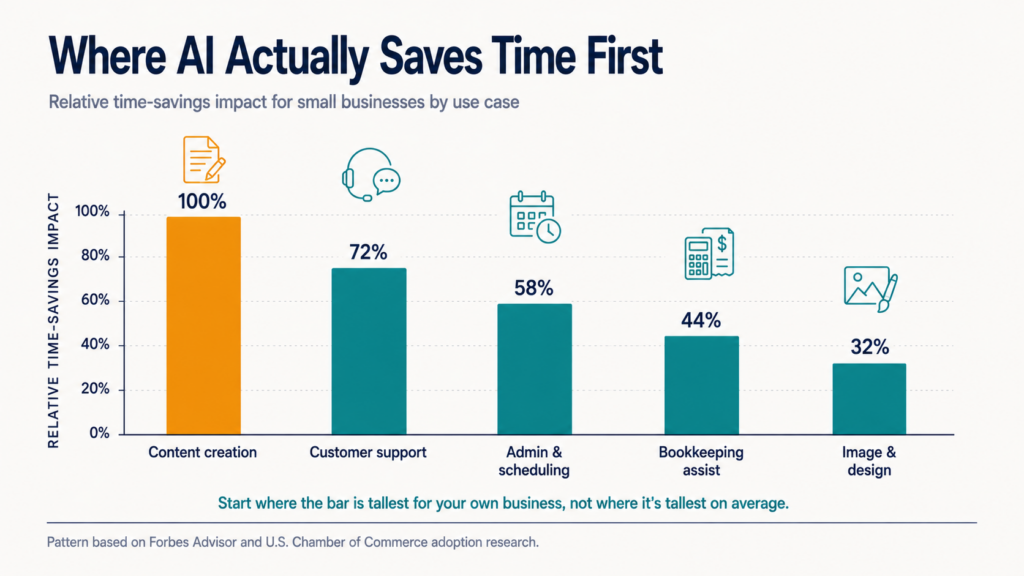
Content creation is the highest-adoption AI use case among small businesses because the time savings are immediate and the risk of a bad output is low, a draft, not a live decision.
ChatGPT and Claude both handle blog drafts, social captions, product descriptions, and email copy from a plain-English prompt, with genuinely usable free tiers.
- Start with the writing you do most often: product descriptions, email replies, or social captions, not the most ambitious piece you can imagine
- Give the AI real context: your brand voice, your audience, three examples of writing you like, not just a bare topic
- Treat the first draft as 70% done, not finished; the editing pass is still yours
For a deeper look at where AI content tools specifically fit into a broader writing workflow, see our guide to AI writing tools for content teams.
Starting With AI Customer Support
AI customer support tools answer repetitive questions (hours, shipping, returns) instantly and hand off anything complex to a human, which is exactly the workload split a small business without a dedicated support team needs.
Most modern help desks, including Freshdesk and Intercom, now build a chatbot layer directly into their existing free or entry tiers rather than selling it as a wholly separate product.
Read Also: Best AI Chatbot Builder for Business in 2026
The realistic starting move: turn on the AI answer feature inside a help desk you already use (or a free tier of one), point it at your existing FAQ page or return policy, and let it handle the questions that currently eat your inbox every single day before you build anything more elaborate.
Starting With AI for Admin and Scheduling
Admin AI tools summarize meetings, draft calendar invites, and turn a messy inbox into a prioritized list, work that is tedious but low-risk, which makes it a safe second category to adopt after content or support.
Google Gemini inside Google Workspace drafts email replies and summarizes long threads for businesses already on Google’s ecosystem. Dedicated scheduling assistants like Motion go further, actively rearranging your calendar around priorities rather than just logging what you tell it.
Starting With AI Bookkeeping Assistance
AI features inside accounting software categorize expenses, flag unusual transactions, and draft plain-English summaries of your financial position, meaningfully reducing manual data entry without replacing your accountant’s judgment.
QuickBooks Online’s AI features increasingly handle transaction categorization and anomaly flagging automatically as part of its existing tiers, covered in more depth in our accounting software buying guide.
The honest boundary here matters: AI can draft and flag, but tax filing, financial strategy, and anything with legal or compliance weight still needs a human accountant reviewing the output, not just approving it on sight.
Starting With AI Image and Design Generation
AI image tools generate social graphics, ad concepts, and basic product visuals from a text prompt, which is genuinely useful for a business with no design budget, provided the output is treated as a draft rather than a finished, publication-ready asset.
Canva’s built-in AI tools are the easiest starting point for a non-designer, since they sit inside a tool most small businesses already use for basic graphics.
What Free AI Plans Actually Get You
Every category above has a genuinely usable free tier, and the honest advice is to run every one of them for at least two weeks before paying for anything.
Free plans typically cap message volume, resolution quality, or advanced features, not core functionality, which means a small business can validate real value before committing budget.
- Free tiers are built to be outgrown on volume or polish, not on core capability
- The upgrade signal is a specific limit you actually hit, not a vague sense you “should” pay
- Running two weeks free costs nothing and tells you more than any review, including this one
Frequently Asked Questions
Which AI tool is best for starting a business?
Rather than one universal answer, the practical starting sequence for a brand-new business is: a general assistant (ChatGPT or Claude) for everything from business plans to marketing copy, plus one category tool matching your single most time-consuming task, whether that’s customer questions, scheduling, or bookkeeping.
Adding a third or fourth tool before the first two are genuinely embedded in your routine usually creates more confusion than value.
What is the 30% rule for AI?
There isn’t one widely recognized, formally defined “30% rule for AI”; the phrase shows up in a few different contexts (some marketing guides suggest capping AI-drafted content at roughly 30% of final published output without a human rewrite pass, for instance) without a single authoritative source.
If you’ve seen this phrase used somewhere specific, treat it as that source’s internal guideline rather than an industry standard, and the safer universal practice is simply: AI drafts, a human always reviews and edits before anything goes out under your business’s name.
Which AI business can I start?
Realistic AI-adjacent small business models include offering AI-assisted services (content writing, virtual assistant work, or basic automation setup for other small businesses), building niche tools on top of existing AI APIs, or consulting on AI adoption for businesses still in the experimentation phase this guide describes.
Any framing that suggests starting an “AI business” requires no skill, effort, or ongoing work is worth treating with real skepticism.
Which 3 jobs will survive AI?
Roles requiring in-person trust, physical skill, and complex human judgment are consistently rated most resistant to AI automation: skilled trades (electricians, plumbers), healthcare roles involving hands-on patient care, and senior roles requiring accountability and relationship-based judgment, such as executive leadership and high-stakes client management.
The common thread across all three is that AI can assist with the paperwork and communication around these jobs while the core work itself still needs a human physically or relationally present.
How can I make $1,000 a day using AI?
There is no reliable, repeatable way to make $1,000 a day using AI tools alone, and any claim promising a fixed daily income from AI specifically should be treated with real skepticism.
AI tools genuinely help existing businesses cut costs and save time, which is the actual, well-documented value this guide covers, but income still depends on your product, your customers, and your effort; AI changes how efficiently you can produce and support a real business, it does not manufacture income out of a prompt.
What are the 5 most popular AI tools?
Among small businesses broadly, the most widely adopted AI tools in 2026 are ChatGPT and Claude for general assistance and content, Canva’s AI features for design, Google Gemini for Workspace-integrated admin tasks, and AI chatbot features built into help desk platforms like Freshdesk and Intercom for customer support.
Popularity is a reasonable starting point for a shortlist, but the category-fit approach covered earlier in this guide matters more than which tool ranks highest overall.
Start With One Problem, Not Every Tool
Software Chronicle is an independent SaaS research publication. AI tool adoption succeeds when it solves one real, specific time drain, and fails when it becomes a collection of subscriptions nobody in the business actually uses.
Our recommendations stay independent of our partnerships. See how in our affiliate disclosure, read our review methodology, or contact us if you want an AI tool shortlist built around your specific business.
Najm Us Sahar Fareed is part of the editorial team at Software Chronicle, a group of SaaS researchers and former software buyers who have collectively evaluated over 200 tools across the categories we cover. With 5 years of experience working with digital marketing agencies across North America, she brings a strong background in content strategy and practical software evaluation.
AI Tools
How AI Tools Work: A Plain-English Explanation (No Math, Promise)

You type a question. You hit Enter. Three seconds later, a machine writes you a better answer than your group chat ever has.
Somewhere between the Enter key and that answer, something genuinely strange happens. And almost nobody who uses AI every day can explain what. That is not a knock on anyone; the industry buries the explanation under words like “transformer architecture” and “inference,” then acts surprised when people either fear AI or worship it.
Here is the secret: the core idea fits in one sentence, and you already understand the hard part because you do it yourself every day. By the end of this guide, you will know exactly what happens in those three seconds, what all nine pieces of jargon actually mean, and why AI tools are simultaneously brilliant and capable of confidently telling you that Australia has two moons.
No math. Promise.
Quick Takeaways
- AI tools are pattern-prediction machines: they learned patterns from enormous amounts of text and generate answers by predicting one small word-piece at a time.
- This is no longer niche knowledge. 88% of organizations now use AI in at least one business function, up from 78% a year earlier, according to McKinsey’s State of AI survey.
- Adoption outpaced every technology before it: Stanford’s 2026 AI Index reports generative AI reached 53% of the population faster than the PC or the internet, and estimates its value to US consumers at $172 billion annually.
- The nine terms that unlock everything: training data, neural network, transformer architecture, token, prompt, inference, context window, temperature, and fine-tuning.
- AI does not “know” facts the way a database does; it predicts plausible text. That single distinction explains both its creativity and its confident mistakes.
How Does AI Work in Simple Words?
In simple words, AI tools work by studying billions of examples of text (or images, or audio), learning the statistical patterns in them, and then generating new responses by predicting what should come next, one small piece at a time, based on your prompt.
It is your phone’s autocomplete, scaled up a few billion times and trained on a meaningful fraction of everything humans have ever written.
Everything else in this article is just unpacking that sentence. Let’s walk through the nine pieces, in the order they matter.
What Is Training Data?
Training data is the mountain of text, code, images, and conversation an AI model studies before you ever meet it: books, websites, articles, forums, documentation.
During training, the model is shown this text with words hidden and asked, billions of times: what comes next? Every wrong guess adjusts it slightly. Repeat at unimaginable scale, and it gets eerily good at the game.
This is why training data quality is destiny. A model mostly learns the world its data describes, gaps, biases, and all. It is the same reason data quality decides everything in analytics: the output can only be as good as what went in.
What Is a Neural Network?
A neural network is the model’s structure: millions of simple number-crunching units organized in layers, where each layer detects slightly more abstract patterns than the last.
Despite the name, it is not a brain. Early layers might pick up on spelling and word fragments; middle layers on grammar and phrasing; deeper layers on things startlingly close to concepts, tone, and logic.
A useful mental picture: a very tall building of filters. Your text goes in the ground floor as raw characters and comes out the top floor as meaning. No single floor “understands” anything; understanding-like behavior emerges from all of them stacked together.
What Is the Transformer Architecture?
The transformer is the 2017 breakthrough design behind modern AI tools, and its superpower is attention: the ability to weigh every word in your text against every other word simultaneously.
Older AI read like a person with a flashlight, one word at a time, forgetting the beginning by the end. Transformers read like someone seeing the whole page at once, noticing that “it” in your sentence refers to “the invoice” from two paragraphs ago.
That is the whole trick. The T in ChatGPT literally stands for Transformer, and nearly every major AI tool you have touched since 2020 is built on this design.
What Is a Token?
A token is the bite-sized chunk AI actually reads and writes: usually a short word or a piece of a longer one, where “cat” is one token but “extraordinary” might be three.
Models do not see letters or words the way you do; they see numbered tokens. Roughly, 1,000 tokens is about 750 English words.
Tokens matter to you for one practical reason: everything is measured in them. Pricing, length limits, and the “memory” of your conversation are all counted in tokens, which brings us to what happens when you press enter.
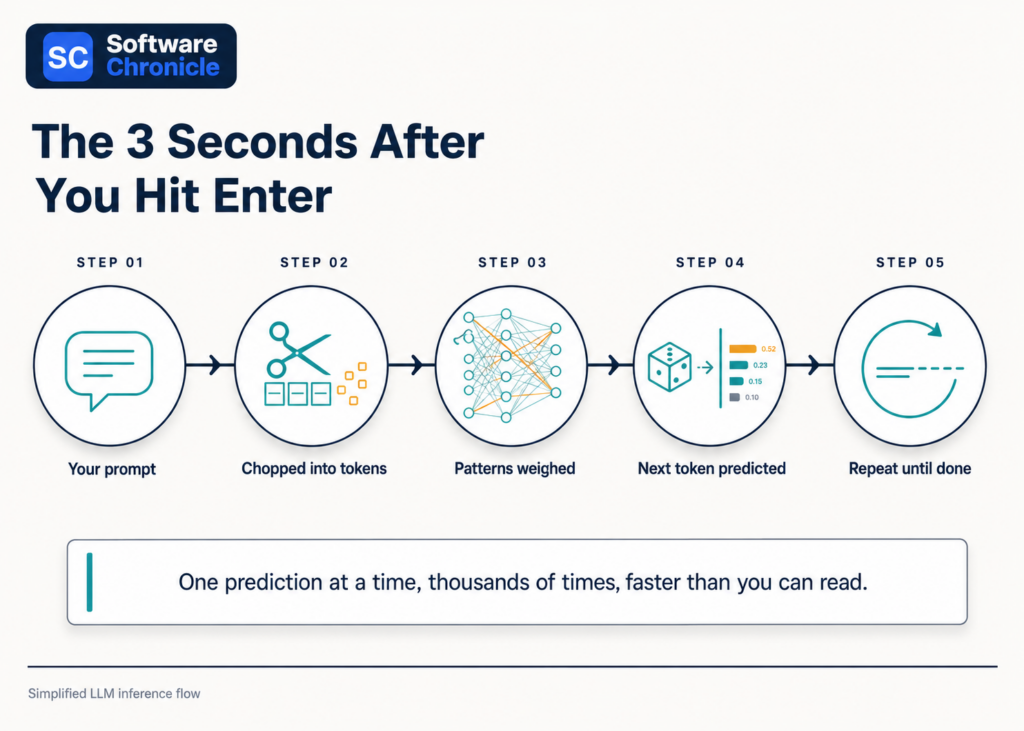
What Actually Happens When You Hit Enter? (Prompts and Inference)
Your prompt (the text you typed) gets chopped into tokens and fed through the network, and the model performs inference: predicting the single most fitting next token, appending it, and repeating until the answer is complete.
That fluid paragraph appearing on your screen was generated one token at a time, each prediction shaped by your prompt and everything generated so far.
This is also why prompt quality changes everything. The model is pattern-matching against your words; a vague prompt matches a million generic patterns, while a specific one (“explain this to a 10-year-old,” “respond as a skeptical lawyer”) narrows the prediction toward exactly the kind of text you want.
Working well with AI is mostly the skill of pointing to its predictions.
What Is a Context Window?
The context window is the model’s working memory: the maximum number of tokens (your conversation plus its replies) it can consider at once, and anything beyond it effectively falls off the whiteboard.
Modern tools have windows spanning hundreds of pages, but the principle holds: an AI does not remember your chat from last month by default. It rereads whatever fits in the window, every single time.
When a long conversation gets weird and the AI “forgets” your instructions from an hour ago, you have usually scrolled off the edge of its whiteboard. Starting a fresh chat with a clean summary often works better than pushing on.
What Is the Temperature Setting?
Temperature is the dial controlling how adventurous the model’s predictions are: low temperature always picks the safest next token, high temperature lets it gamble on less likely ones.
At temperature near zero, you get consistent, careful, sometimes boring output, ideal for factual summaries and code. Turned up, the model takes creative detours, ideal for brainstorming and fiction, with a rising risk of nonsense.
Most consumer chat tools set this for you behind the scenes. But now you know why the same question can produce a crisp answer today and a slightly unhinged one tomorrow: you are sampling from a probability distribution, not querying a database.
What Is Fine-Tuning?
Fine-tuning takes a fully trained general model and trains it further on a focused dataset, turning a generalist into a specialist: a support agent, a legal summarizer, a medical coder.
It is medical school after college. The base model already speaks the language; fine-tuning teaches it your domain, your tone, and your rules.
This is how AI shows up inside business software. The AI answering tickets in your help desk or surfacing churn risks in customer analytics platforms is typically a general model fine-tuned and constrained for one job, which is precisely why it behaves more reliably there than a blank chatbot would.
Read Also: What Is Business Intelligence Software? A Beginner to Pro Guide
Why Do AI Tools Get Things Confidently Wrong?
Because AI predicts plausible text rather than retrieving verified facts, it can generate statements that sound perfectly authoritative and are perfectly false, a failure mode known as hallucination.
The model is doing its job, completing the pattern beautifully; the pattern just happens to describe a court case that never existed. Nothing inside is checking against reality unless the tool is explicitly connected to search or a database.
The practical rule: treat AI output on facts the way you would treat a brilliant, well-read friend speaking from memory. Wonderful for drafts, explanations, and ideas; verify anything you plan to rely on. Notice, too, what McKinsey’s data shows: even with 88% of organizations using AI somewhere, nearly two-thirds have not scaled it enterprise-wide, and closing that trust gap is a large part of why.
Frequently Asked Questions
How does AI work in simple words?
AI works by learning patterns from billions of examples and then predicting the most fitting response to your input, one token at a time. It does not look up answers in a database; it generates them the way autocomplete suggests your next word, just with vastly more sophistication and context.
What is the AI tool and how does it work?
An AI tool is an application (like ChatGPT, Claude, or Gemini) built around a trained model: you provide a prompt, the tool runs inference through its neural network, and it streams back a generated response token by token. The app layer adds the chat interface, memory features, safety filters, and connections to search or files.
What is AI in 10 points?
AI in 10 points:
1) AI learns patterns from massive training data.
2) The model is a layered neural network.
3) Modern tools use the transformer architecture.
4) Text is processed as tokens, not words.
5) Your input is called a prompt.
6) Generating an answer is called inference.
7) The context window is its working memory.
8) Temperature controls how creative it gets.
9) Fine-tuning specializes a general model.
10) It predicts plausible text, so outputs need human verification.
How to work with AI tools?
Work with AI tools by giving specific prompts (role, audience, format, constraints), iterating instead of settling for the first draft, keeping important instructions inside the context window, and verifying factual claims before using them.
Treat it like a fast, talented junior colleague: excellent output, but you sign off on the final version.
Who is the father of AI?
John McCarthy, the American computer scientist who coined the term “artificial intelligence” in 1955 and organized the 1956 Dartmouth Conference that launched the field, is widely called the father of AI.
Alan Turing is honored as its intellectual grandfather for asking, years earlier, whether machines could think.
Is ChatGPT an AI tool?
Yes. ChatGPT is the most widely used AI tool: a chat application built on OpenAI’s GPT family of large language models, which are transformer-based neural networks trained on internet-scale text.
Everything in this guide (tokens, context windows, temperature, inference) describes exactly what happens each time it answers you.
Explanations Without the Hand-Waving
Software Chronicle is an independent SaaS research publication. We believe you make better software decisions when you understand how the machinery actually works, so we write the plain-English versions the vendors skip.
Curious how we evaluate the AI-powered tools we review? Our review methodology covers it, our affiliate disclosure covers how we fund it, and you can always contact us with a concept you want explained next.
Najm Us Sahar Fareed is part of the editorial team at Software Chronicle, a group of SaaS researchers and former software buyers who have collectively evaluated over 200 tools across the categories we cover. With 5 years of experience working with digital marketing agencies across North America, she brings a strong background in content strategy and practical software evaluation.
AI Tools
AI Tools for SEO: Do They Actually Work? (Tested & Ranked for 2026)
There is a version of this article that just lists five tools and calls it a day. This is not that article. The question of whether AI tools for SEO actually work is one that gets dodged constantly, replaced with feature screenshots and affiliate links that tell you nothing about what happens after you hit publish.
The honest answer is more interesting: some of them genuinely move rankings, some of them are expensive content spinners dressed up with dashboards, and knowing the difference is worth more than any individual subscription.
SEO has changed significantly. Google’s algorithms now evaluate topical clusters, entity optimization, and search intent alignment in ways that pure keyword stuffing never addressed. AI tools that understand this: that analyze semantic keywords, surface content gaps, and map out topic authority can genuinely accelerate results. Tools that don’t are just autocomplete with an SEO badge.
We’ve gone deep on the five platforms worth your attention to give you the full picture.
So, Do AI SEO Tools Actually Work?
Short answer: yes, selectively. Here’s the longer, more useful answer.
AI SEO tools work when they help you do things faster and smarter than you could manually.Tthings like identifying content gaps across hundreds of competitor pages, generating semantically relevant keyword clusters from a seed topic, optimizing content structure against top-ranking SERP results, and flagging missing entities that search engines associate with authority on a topic.
They don’t work when they’re used as a content replacement. Pages written entirely by AI with no editorial oversight, no real expertise, and no unique perspective are increasingly identifiable by both Google’s systems and human readers.
Google’s Helpful Content guidelines are explicit: content should demonstrate first-hand expertise and genuine value to the reader. AI tools that help you produce that kind of content faster? Valuable. AI tools that produce that content for you wholesale? A short-term shortcut with long-term ranking risk.
| The Rule of ThumbUse AI SEO tools to research smarter, structure better, and optimize more precisely, but write like a human who knows their subject. The tools in this list are ranked partly on how well they support that workflow. |
What the Data Says About AI in SEO
- 61% of marketers say AI is the most important aspect of their data strategy (Salesforce)
- Content optimized with AI SEO tools increases organic traffic by 40% to 60%. (TG)
- 82% of SEO professionals report using AI in their workflow as of 2026 (SQ Magazine)
- Pages that address search intent comprehensively earn 45% more organic traffic than keyword-matched pages alone (LLMrefs)
- The global AI in SEO market is projected to reach $32.6 billion by 2035, growing at 23.4% CAGR (Market.us)
Quick Takeaways
- Surfer SEO is the best tool for on-page content optimization — real-time scoring against live SERP data is its core strength
- Semrush is the most complete platform: keyword research, SERP analysis, content gap, site audit, and AI writing all in one
- Frase is the best value for content teams that need fast, research-driven brief creation and optimization
- MarketMuse is built for topical authority strategy — best for sites playing a long content game at scale
- NeuronWriter offers the strongest feature-to-price ratio for freelancers and small agencies
All 5 Tools: At a Glance
| Tool | Best For | AI Keyword Research | Content Optimization | SERP Analysis | Content Briefs | Starting Price |
|---|---|---|---|---|---|---|
| Surfer SEO | On-page optimization | Yes | Real-time scoring | Yes | Yes | $89/mo |
| Semrush | All-in-one SEO suite | Advanced | SEO Writing Assistant | Advanced | Yes | $139.95/mo |
| Frase | Brief creation + optimization | Yes | Yes | Basic | Excellent | $45/mo |
| MarketMuse | Topical authority | Advanced | Topic modeling | Yes | Advanced | $149/mo |
| NeuronWriter | Budget content optimization | Yes | SERP-based scoring | Yes | Yes | $23/mo |
Surfer SEO
| 🏄 Surfer SEOBest for on-page content optimization with real-time SERP scoring |
Surfer SEO built its reputation on one thing: real-time content scoring against the actual pages ranking on page one for your target keyword. You write inside Surfer’s editor, and as you type, it tells you whether your word count, heading structure, NLP term usage, and entity coverage are competitive with what’s already ranking. For teams serious about on-page optimization, it’s the closest thing to a live map of what Google wants to see.
What Surfer SEO Does Well
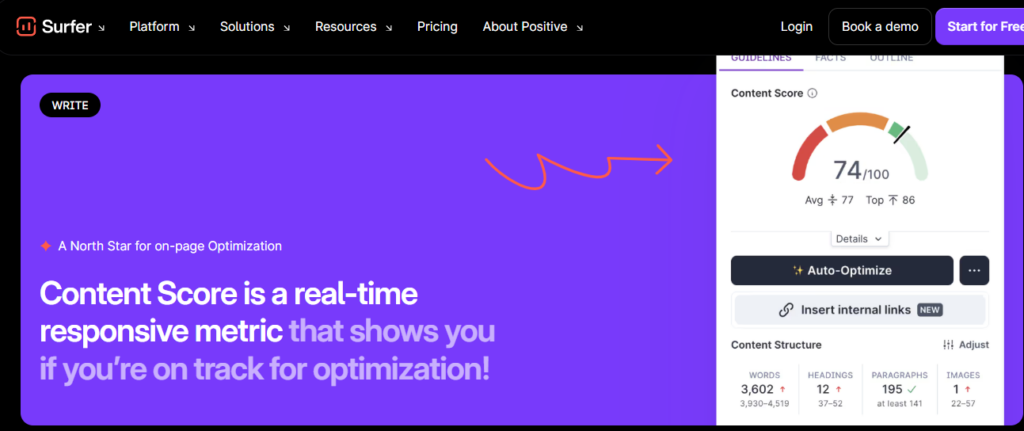
- Content Score: Surfer’s signature feature. A live 0-100 score that updates as you write, measuring how well your content matches the semantic keyword distribution, structure, and NLP signals found in top-ranking pages for your target keyword.
- SERP Analyzer: Breaks down the top 20 results for any keyword including word count, heading patterns, keyword usage, page speed, backlink counts, giving you a clear structural picture of what ranks.
- AI Content Outline: Generates a full content brief in seconds: H2/H3 structure, suggested word count, semantic keywords to include, and questions to answer based on live SERP data, not generic templates.
- Topical Map: A newer feature that identifies the full cluster of topics your site should cover to build authority in a niche, surfacing content gaps your competitors have already filled.
- Keyword Research: Clusters keyword ideas by semantic relevance and search intent so instead of a flat list of 500 terms, you get grouped topic clusters you can build content around strategically.
Where It Falls Short
- Backlink analysis is limited: Surfer is an on-page tool; for off-page SEO you’ll still need Ahrefs or Semrush
- The Content Score is a guide, not a guarantee: over-optimizing to hit 100 can produce stilted, keyword-heavy prose
- Entry plan limits the number of articles and team seats: agencies need the Scale plan or above
| Surfer SEO VerdictThe best pure on-page optimization tool available. If your content team publishes frequently and wants data-driven guidance on exactly what to write and how to structure it, Surfer delivers consistently. Pair it with a keyword research tool like Semrush for a complete workflow. |
| Plan | Price/mo | Key Inclusions |
|---|---|---|
| Essential | $99 | 30 articles/mo, Content Editor, Keyword Research |
| Scale | $182 | 100 articles/mo, AI Outline, SERP Analyzer, Topical Map |
| Scale AI | $219 | Full AI automation, bulk content creation, priority support |
| Enterprise | $999 | Unlimited, white-label, dedicated CSM |
Prices may vary depending on youe needs.
Semrush
| 📊 SemrushBest all-in-one AI SEO platform for keyword research, audits, and content |
Semrush is the closest thing SEO has to a single platform that does everything and actually does most of it well. Keyword research, competitor analysis, backlink auditing, rank tracking, site health, content optimization, and AI-assisted writing are all available under one login. For teams that don’t want to manage a stack of five different tools, Semrush is the logical home base.
What Semrush Does Well
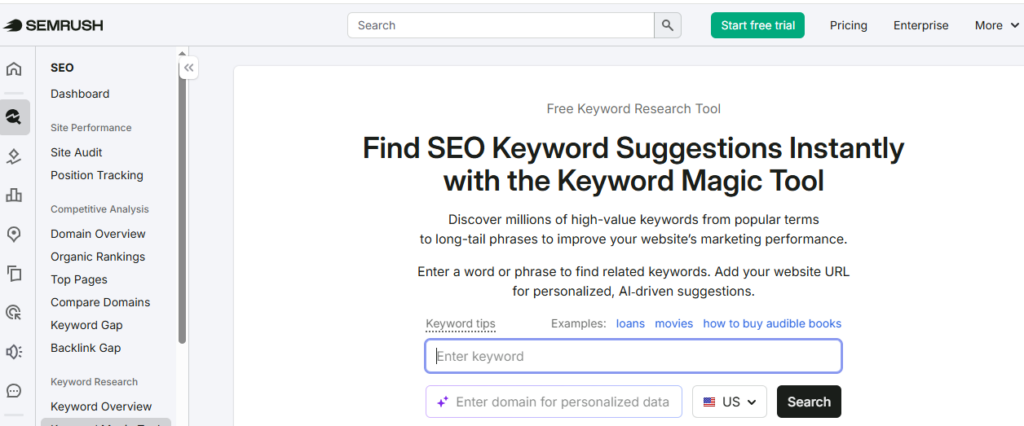
- Keyword Magic Tool: One of the largest keyword databases available with over 25 billion keywords and AI-powered filtering by intent (informational, navigational, commercial, transactional) and semantic clustering that groups related terms automatically.
- SEO Writing Assistant: Real-time content scoring similar to Surfer’s. It analyzes readability, target keyword usage, semantic keyword inclusion, tone of voice consistency, and originality against a live SERP benchmark.
- Content Gap Analysis: Enter your domain and up to five competitors. Semrush shows you every keyword your competitors rank for that you don’t. One of the most actionable content planning features in any SEO tool.
- AI Meta Description and Title Tag Generator: Generates optimized meta descriptions and title tags based on your target keyword and page content. One of the underrated time-savers for teams managing large content libraries.
- Topic Research: Enter a seed topic and get a full map of subtopics, related questions (pulled from PAA and forums), and trending headlines, essentially a content brief generator built on real search data.
Where It Falls Short
- Pricing is the highest on this list: the Pro plan starts at $117.335/mo, and most serious features require Guru or above
- Data overload is real: the platform is enormous, and new users often struggle to find the features most relevant to their workflow
- The SEO Writing Assistant, while useful, isn’t as deep as Surfer’s real-time content scoring for pure on-page optimization
| Semrush VerdictThe strongest platform in this comparison for teams that need keyword research, competitor analysis, technical SEO auditing, and content optimization in one place. The price is justified if you’re replacing multiple tools. For pure content optimization, Surfer is more focused but for a complete SEO workflow, Semrush covers more ground than anything else here. |
| Plan | Price/mo | Key Inclusions |
|---|---|---|
| Pro | $117.33 | 5 projects, 500 KW tracking, SEO Writing Assistant |
| Guru | $208.33 | 15 projects, Content Marketing Platform, historical data |
| Business | $416.33 | 40 projects, API access, white-label, extended limits |
Prices may vary.
| 📝 FraseBest for fast, research-driven content briefs and AI-assisted writing |
Frase occupies a sweet spot that the larger platforms miss: it’s fast, intuitive, and built specifically for the content brief-to-draft workflow. Where Semrush overwhelms with data and Surfer focuses tightly on scoring, Frase focuses on getting a writer from blank page to structured, well-researched draft as efficiently as possible. For content teams publishing at volume, this translates directly into hours saved per article.
What Frase Does Well
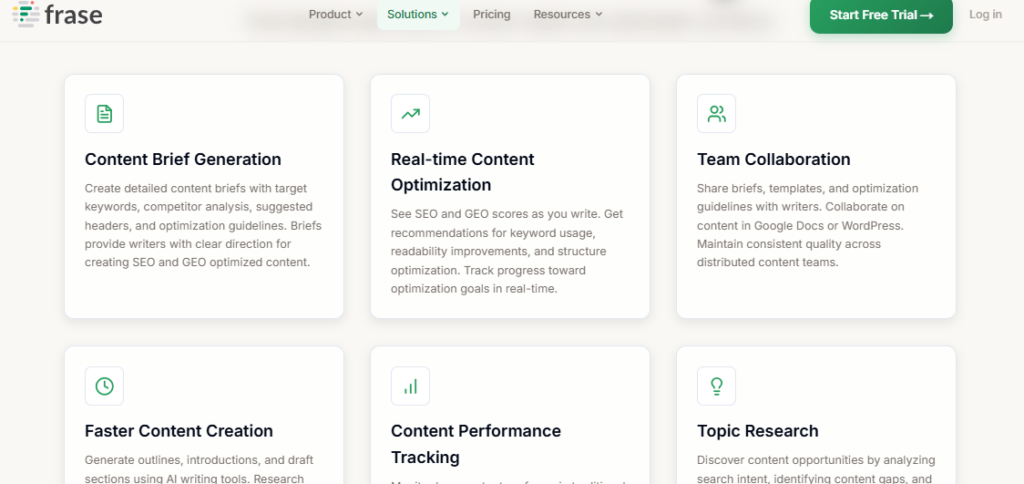
- AI Content Brief Generation: Frase analyzes the top 20 SERP results for your target keyword and builds a full content brief in under 30 seconds, including recommended headings, key statistics, questions to answer, and topics to cover based on what’s actually ranking.
- SERP Research Sidebar: While you write, the right-hand panel shows you exactly what each top-ranking competitor covers including, topics, statistics, key points so you can benchmark and fill gaps without leaving the editor.
- Topic Score: Similar to Surfer’s Content Score, Frase assigns a topic coverage score as you write, measuring whether you’ve covered the semantic entities and subtopics found across top-ranking pages.
- AI Writer: Built into the editor. It generates introductions, expands bullet points, rewrites sections, and completes partial paragraphs. More useful as a drafting accelerator than a full content generator.
- Questions Research: Aggregates PAA questions, Reddit threads, Quora discussions, and forum content related to your topic, ideal for building FAQ sections and identifying what real users are actually asking.
Where It Falls Short
- Keyword research depth is limited compared to Semrush. Frase is a content tool, not a full SEO suite
- AI-generated content quality is average; works best as a starting point rather than finished copy
- Backlink and technical SEO features are absent. You’ll need a separate tool for those
| Frase VerdictThe best tool in this comparison for content teams focused on research speed and brief quality. At $45/month for the Solo plan, it’s also the best value for writers and small agencies who need SERP-based optimization without the complexity or price of Semrush. Pair it with a dedicated keyword research tool for a complete workflow. |
| Plan | Price/mo | Key Inclusions |
|---|---|---|
| Starter | $49 | 1 user, 30 docs/mo, AI Writer, SERP research |
| Professionl | $129 | 3 users, unlimited docs, full brief generation |
| Scale | $299 | 5 users, advanced AI, team collaboration, priority support |
Prices may vary.
MarketMuse
| 🧠 MarketMuseBest for building topical authority and long-term content strategy at scale |
MarketMuse plays a different game to the other tools in this list. It’s not primarily a content editor or a keyword research tool. It’s a topical authority platform. Its core insight is that Google doesn’t just rank individual pages; it ranks sites that demonstrate comprehensive, authoritative coverage of a topic area. MarketMuse maps that territory for you, identifies where your site’s authority gaps are, and tells you exactly what to create to fill them.
What MarketMuse Does Well
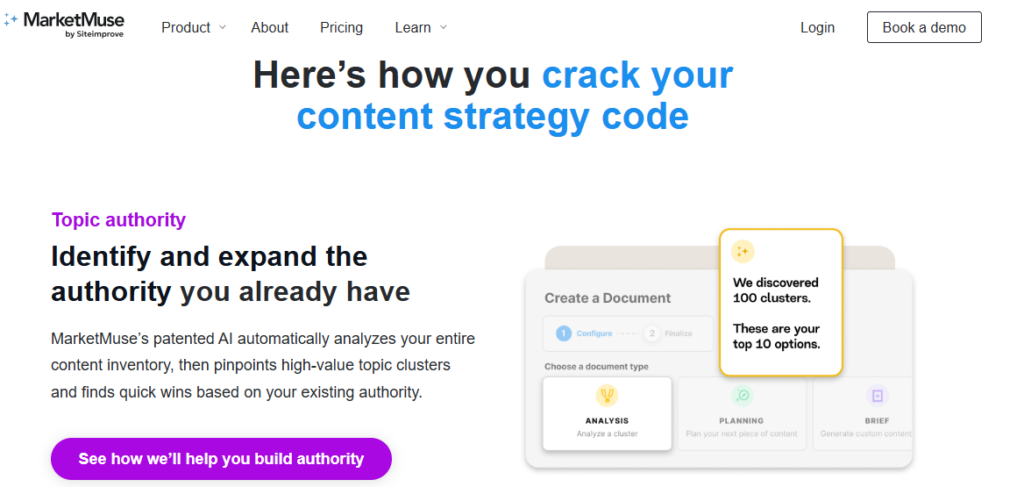
- Content Inventory and Audit: MarketMuse crawls your entire site and scores every page against topic coverage benchmarks, giving you a prioritized view of which existing pages need updating and which gaps represent your highest-value creation opportunities.
- Topical Authority Score: Measures how comprehensively your site covers a given topic relative to competitors, using a proprietary model trained on millions of pages. This is the clearest expression of entity optimization available in any tool.
- Topic Model: For any target keyword, MarketMuse generates a full topic model including every related entity, subtopic, and concept that search engines associate with authority on the subject. Invaluable for brief creation and editorial planning.
- Competitive Content Gap: Identifies specific content pieces your competitors have published that cover topics your site hasn’t addressed, mapped against your existing authority scores to prioritize impact.
- Content Briefs: The most detailed content briefs of any tool in this comparison with recommended word count, target KPIs, questions to answer, related topics to cover, internal linking suggestions, and competitor benchmarks.
Where It Falls Short
- Starting price of $149/month positions it above Surfer and well above Frase — hard to justify for individual bloggers or small teams
- The free plan is very limited — useful for evaluation but not practical workflow
- The depth of data can be overwhelming; MarketMuse takes longer to onboard than simpler tools
| MarketMuse VerdictThe most strategically sophisticated tool in this comparison. If you’re building a content-driven SEO strategy for a site with real scale ambitions — a media publication, a large SaaS blog, an authority site — MarketMuse’s topical modeling and authority scoring will inform decisions that simpler tools can’t. For smaller operations, the price-to-value ratio tips against it. |
| Plan | Price/mo | Key Inclusions |
|---|---|---|
| Free | $0 | 10 queries/mo, limited content briefs |
| Optimize | $149 | 100 queries/mo, full topic modeling, content briefs |
| Research | $249 | Unlimited queries, competitive analysis, inventory |
| Strategy | Custom | Full site audit, dedicated strategist, custom reporting |
Prices may vary.
| ⚡ NeuronWriterBest value AI SEO tool for freelancers, bloggers, and small agencies |
NeuronWriter is the tool that surprises people who’ve only heard of the bigger names. At $19/yearly for a fully functional plan, it delivers SERP-based content optimization, semantic keyword analysis, AI-assisted writing, and content brief generation that competes directly with tools charging three to five times as much. For freelancers, bloggers, and small agencies watching their software spend, it’s the most honest value in AI SEO software right now.
What NeuronWriter Does Well
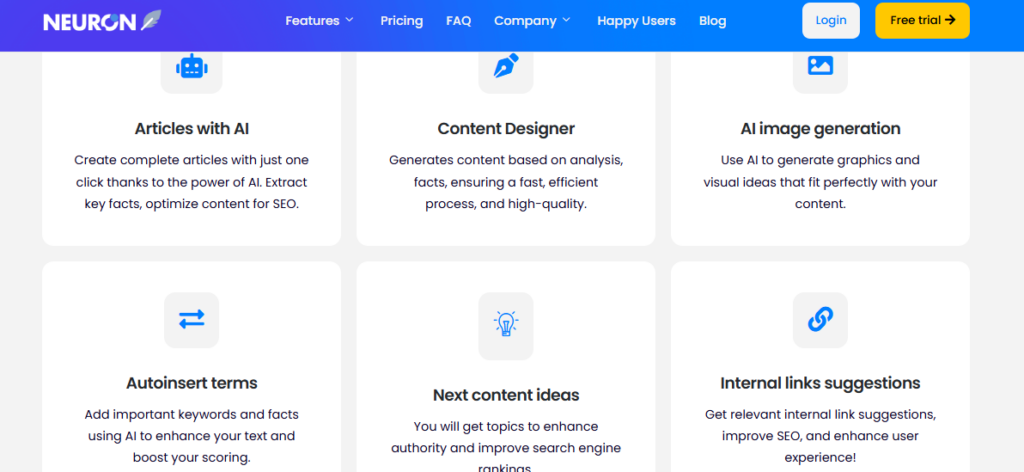
- NLP Content Optimization: NeuronWriter uses Google’s own Natural Language Processing API to identify the semantic terms and entities that top-ranking pages use and scores your content against that benchmark in real time, just like Surfer.
- SERP Analysis: Analyzes the top 30 ranking pages for your target keyword, breaking down their structure, word count, heading patterns, and NLP term usage, giving you a clear optimization target.
- Content Brief Builder: Generates structured content briefs based on SERP data, recommended headings, questions to answer, terms to include, and competitor gaps to fill.
- AI Writing Assistant: Built-in GPT-powered writing tools for generating introductions, expanding sections, rewriting paragraphs, and completing outlines, available without leaving the editor.
- Internal Linking Suggestions: Suggests relevant internal links from your existing content library as you write: a feature that many higher-priced tools don’t include.
Where It Falls Short
- No standalone keyword research tool: you’ll need Google Search Console, Ahrefs, or Semrush to identify keywords before bringing them into NeuronWriter
- UI is functional but less polished than Surfer or Frase
- Content scoring model is solid but not quite as sophisticated as MarketMuse’s topic modeling
| NeuronWriter VerdictThe best-kept secret in AI SEO tools. For anyone who finds Surfer’s pricing hard to justify or wants a Frase alternative that doesn’t compromise on core optimization features, NeuronWriter delivers remarkably well at a fraction of the price. The only real gap is keyword research. Pair it with Google Search Console or a free Semrush account to cover that base. |
| Plan | Price/mo (billed annually) | Key Inclusions |
|---|---|---|
| Bronze | $19 | 25 analyses/mo, AI writer, NLP optimization |
| Silver | $37 | 50 analyses/mo, content planner, SERP analysis |
| Gold | $57 | 75 analyses/mo, team access, advanced AI writing |
| Platinum | $77 | 150 analyses/mo, API, white-label, priority support |
Prices my vary.
Read Also: 9 Best AI Writing Tools for Content Teams in 2026
Head-to-Head: Which AI SEO Tool Wins on Each Use Case?
| Use Case | Winner | Why |
|---|---|---|
| On-page content optimization | Surfer SEO | Real-time SERP scoring is the most precise available |
| Keyword research + intent analysis | Semrush | 25B+ keyword database with AI clustering and intent filters |
| Content brief creation speed | Frase | 30-second SERP-based briefs; fastest research-to-brief workflow |
| Topical authority + content strategy | MarketMuse | Topic modeling and authority scoring go deeper than anyone else |
| Best value for budget | NeuronWriter | Full NLP optimization + AI writer at $23/mo is unbeaten |
| All-in-one single platform | Semrush | Covers more SEO use cases than any other tool here |
| Best for freelancers / solo bloggers | NeuronWriter / Frase | Both offer strong optimization features at accessible price points |
| Best for content agencies | Surfer SEO / Semrush | Scalable plans with team features and client project management |
| AI meta description + title tags | Semrush | Dedicated AI generator for meta content built into the platform |
| Search intent alignment | Frase / Surfer SEO | Both analyze SERP intent signals and structure briefs around them |
Which AI SEO Tool Is Right for You?
The right tool depends on your role, team size, and primary bottleneck:
- Freelance writer or solo blogger: Start with NeuronWriter. You get real NLP optimization and AI writing at a price that makes sense for one-person operations.
- Content manager publishing 10-30 posts/month: Frase is built for your workflow: fast briefs, research sidebar, topic scoring, and a usable AI writer at a price that scales.
- SEO specialist or strategist: Semrush for keyword research and competitor analysis, Surfer for on-page optimization. These two together cover the full workflow better than any single platform.
- Head of content at a growth-stage company: MarketMuse if topical authority is your strategic priority. Surfer if on-page quality and volume are the primary bottleneck.
- Agency managing multiple client sites: Semrush for its project management, white-label reporting, and breadth. Surfer as a writing-side add-on for production teams.
Didn’t find what you were looking for? Read: 11 Best AI Chatbot Builders for Business in 2026
Frequently Asked Questions
Are AI SEO tools worth it?
Yes, AI SEO tools are absolutely worth the investment, provided you use them as administrative accelerators rather than a replacement for strategy.
They dramatically lower costs often cutting technical workflows by up to 32% and eliminate hours of manual labor by scraping vast sets of data in seconds. If your goal is to scale competitor research, speed up site audits, or build rapid content outlines, the ROI is high. They lose their value entirely if you use them to blindly publish unedited automated content.
Can I use AI to help with SEO?
Yes, you can and should use AI to assist your SEO efforts to stay competitive. In fact, an Ahrefs study revealed that 86.5% of top-ranking web pages leverage AI-assisted processes in their workflow. The smartest ways to use AI for SEO include:
- Running instant technical site crawls to find broken links and broken schema.
- Mapping keyword clusters based on semantic search intent.
- Generating structured content outlines using real-time SERP data.
- Translating text and generating missing meta descriptions at scale.
What is the 10-20-70 rule for AI?
The 10-20-70 rule for AI states that successful digital transformation relies far more on people than technology. The percentage breakdown dictates that:
- 10% of your focus and effort goes into the algorithms and models.
- 20% goes toward the underlying data infrastructure and software platforms.
- 70% must be dedicated to the people, internal processes, and change management required to use those tools effectively.
Is SEO dead or evolving in 2026?
SEO is not dead; it is actively evolving into a hybrid discipline called Generative Engine Optimization (GEO). AI answers provided by tools like ChatGPT, Gemini, and Perplexity do not invent information out of thin air; they cite and pull data directly from highly optimized websites ranking in top traditional search positions. Traditional keyword stuffing is dead, but organizing high-quality data so AI agents can crawl and trust your site is more crucial than ever.
Is SEO replaceable by AI?
No, SEO cannot be fully replaced by AI because algorithmic optimization requires human judgment, context, and creative business strategy. While AI handles the execution of data-heavy tasks, it completely lacks the capacity for real-world relationship building, local market insight, and complex site migrations. Because search algorithms require human-centric verification, automated systems cannot replace the oversight needed to guide a brand’s strategy.
What is the 30% rule for AI?
The 30% rule for AI is a workflow framework specifying that AI should handle no more than 30% of a task or content piece, leaving the remaining 70% to human oversight, strategy, and creative editing. In content creation, adhering to this ensures your brand avoids generating generic “AI-slop” that search engines routinely filter out. It establishes a balanced human-machine partnership where the AI acts as a foundational support layer, not a solo creator.
Is ChatGPT good for SEO?
Yes, ChatGPT is excellent for SEO brainstorming, formatting, and analysis, but it is a poor choice for raw copy production. It excels at building programmatic outlines, spinning up regex formulas for Google Search Console, or clustering keywords by search intent. However, if you let it write your entire article without heavy editing, it lacks the original data, unique perspectives, and first-party expert quotes necessary to satisfy search ranking guidelines.
What is the 80/20 rule of SEO?
The 80/20 rule of SEO (the Pareto Principle) means that 80% of your search engine traffic will come from 20% of your content and keywords. In practice, this means webmasters should spend less time publishing a massive volume of low-performing pages, and instead dedicate the bulk of their optimization resources to protecting, updating, and building links to the core 20% of high-intent pages that actually drive business conversions.
Which 3 jobs will survive AI?
While technical workflows continue to shift, three broad categories of employment are highly resilient to AI automation due to their deep reliance on human traits:
- Strategic Leaders and Decision Makers: Roles requiring high-level ethical judgment, long-term vision, crisis management, and complex stakeholder negotiation.
- Creative Innovators and Researchers: Positions built on original problem solving, generating net-new scientific hypotheses, or writing unique thought-leadership pieces that do not yet exist on the internet.
- Empathy-Driven and Relational Specialists: Careers heavily anchored in emotional intelligence, deep human empathy, and relationship building, such as advanced behavioral therapists, complex negotiators, and community care leaders.
Research-Backed Reviews With Software Chronicle
Software Chronicle is an independent SaaS research publication testing software across SEO, marketing, CRM, HR, finance, customer support, and more. We go hands-on with every platform we cover, benchmark features against real workflows, and publish findings that help you make smarter software decisions.
Our editorial process is independent of the vendors we review. We evaluate platforms based on performance, not partnerships and we’re upfront about affiliate relationships so you always know where we stand.
Read how we approach reviews on our how we review software page, and check our disclaimer for full disclosure.
Have a question or a tool you’d like us to review? Contact us here.
Najm Us Sahar Fareed is part of the editorial team at Software Chronicle, a group of SaaS researchers and former software buyers who have collectively evaluated over 200 tools across the categories we cover. With 5 years of experience working with digital marketing agencies across North America, she brings a strong background in content strategy and practical software evaluation.
- CRM for Freelancers: Do You Really Need One?

- CRM for Real Estate Agents: Best Options

- CRM Integration Guide: Connect Your Tools Without Breaking Your Data

- CRM Pricing Guide: What Does CRM Software Actually Cost? (2026)

- Task Management vs Project Management: What’s the Difference?

- Project Management Methodologies: Agile vs. Scrum vs. Kanban vs. Waterfall
- Gantt Chart Software: Do You Need It? (An Honest Answer)

- CRM + Marketing Automation: How They Work Together

-

 Blog5 months ago
What Is Accounting Software? The Complete SMB Guide to Managing Finances
-
 Blog4 months ago
11 Best No-Code App Builders for Business in 2026
-

 Blog3 months ago
How to Choose Accounting Software for Your Business: The Ultimate Buyer’s Guide
-

 Blog3 months ago
How to Choose Project Management Software: A No-Nonsense Buying Guide for 2026
-

 Blog2 months ago
How to Choose Customer Support Software (Without Regretting It in Six Months)
-
 Blog4 months ago
9 Best No-Code Website Builders in 2026
-
 Blog4 months ago
11 Agile Project Management Tools — Full Guide for Modern Teams (2026)
-
 AI Tools4 months ago
9 Best AI Writing Tools for Content Teams in 2026